.webp)


.svg)


.svg)
.svg)
Se há uma coisa que todo proprietário de site deseja desde o surgimento da internet, é mais tráfego.
Mais visitas significam mais pessoas comprando, agendando serviços, lendo seu conteúdo e gerando receita. Existem dezenas de estratégias viáveis para atrair mais pessoas para o seu site, mas aquela em que você deve focar vai mudar dependendo das suas circunstâncias.
Alguns proprietários de sites podem querer investir ainda mais em SEO, enquanto outros podem precisar focar no tráfego segmentado que a publicidade paga pode trazer, e muitos outros vão querer se concentrar em garantir que o tráfego que já têm continue voltando. A resposta “certa” depende exatamente de qual problema você está enfrentando.
Aqui estão 9 das situações mais comuns que podem estar limitando o seu tráfego web e como corrigi-las:
Mais visitas significam mais pessoas comprando, agendando serviços, lendo seu conteúdo e gerando receita. Existem dezenas de estratégias viáveis para atrair mais pessoas para o seu site, mas aquela em que você deve focar vai mudar dependendo das suas circunstâncias.
Alguns proprietários de sites podem querer investir ainda mais em SEO, enquanto outros podem precisar focar no tráfego segmentado que a publicidade paga pode trazer, e muitos outros vão querer se concentrar em garantir que o tráfego que já têm continue voltando. A resposta “certa” depende exatamente de qual problema você está enfrentando.
Aqui estão 9 das situações mais comuns que podem estar limitando o seu tráfego web e como corrigi-las:
1. O site é novo e recebe pouco ou nenhum tráfego
Um novo site pode obter um aumento de tráfego rapidamente por meio de publicidade paga, mas também é importante começar a investir em uma fonte mais sustentável de visitas.
Identificando o problema
Este é o problema mais simples de identificar: é improvável que um novo site receba muito tráfego até que você comece a promovê-lo e a informar as pessoas de que ele existe.
Como corrigir isso
Um novo site é um momento empolgante para um profissional de marketing — ele traz muito potencial e a chance de realmente definir a direção. A resposta honesta (ainda que simples) para esse problema é que, neste momento, você realmente poderia tentar qualquer coisa e começar a gerar mais algumas visitas. Dito isso, há algumas estratégias que fazem mais sentido neste estágio inicial.
Você pode abordar esse problema de duas maneiras: uma solução de longo prazo ou uma solução mais rápida.
Você pode abordar esse problema de duas maneiras: uma solução de longo prazo ou uma solução mais rápida.
Embora o SEO seja frequentemente apontado como a melhor fonte de tráfego para sites, com só o Google gerando quase 63% de todas as visitas, ele não é um processo rápido, e como novo dono de um site, você quer resultados mensuráveis agora.
. Ao contrário do ritmo lento e constante de crescimento que vem do blogging, os anúncios pagos podem, com o orçamento e a segmentação certos, trazer uma onda de visitas quase instantânea.
Você pode veicular anúncios nas redes sociais, nos ou como os tradicionais anúncios em banner em que todos pensamos quando ouvimos a expressão “publicidade online”. Eles podem ser criados e segmentados com um nível incrível de precisão por todo tipo de critério, transformando quase qualquer pessoa em um potencial visitante do site.
Cada um tem seu uso ideal:
. Ao contrário do ritmo lento e constante de crescimento que vem do blogging, os anúncios pagos podem, com o orçamento e a segmentação certos, trazer uma onda de visitas quase instantânea.
Você pode veicular anúncios nas redes sociais, nos ou como os tradicionais anúncios em banner em que todos pensamos quando ouvimos a expressão “publicidade online”. Eles podem ser criados e segmentados com um nível incrível de precisão por todo tipo de critério, transformando quase qualquer pessoa em um potencial visitante do site.
Cada um tem seu uso ideal:
- Anúncios de pesquisa: ideais para segmentar a urgência e para serviços que as pessoas provavelmente não procurariam por impulso.
- Anúncios gráficos e vídeos: mais gerais. Ótimos para divulgar uma oferta específica, segmentar interesses e aumentar o reconhecimento da marca.
- Redes sociais: melhor para segmentar clientes “semelhantes” que compartilham interesses com seu tráfego existente.
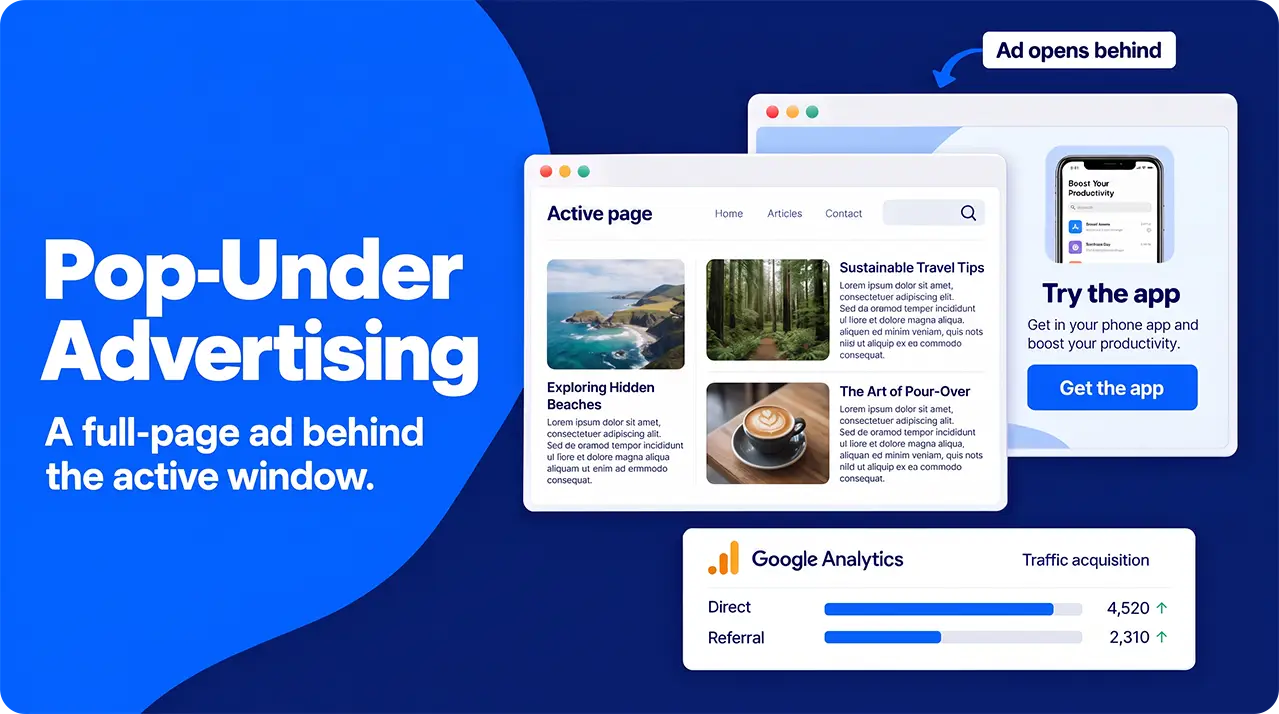
- Awareness Building- though click-through rates are generally pretty low, it’s very hard to ignore a full-page advert entirely.
Configurar uma campanha é bastante simples: basta criar a imagem, o vídeo ou o texto que você quer que as pessoas vejam usando o software que preferir, informar às redes de anúncios para quem você quer exibi-lo e definir seu orçamento na plataforma que estiver usando.
Em poucos instantes, você pode começar a ver suas primeiras visitas chegando pelo seu anúncio. Há muitos detalhes e refinamentos com os quais você pode trabalhar, e abordamos isso em nosso, mas a regra geral é: quanto maior o orçamento, mais cliques você receberá.
As desvantagens de toda essa flexibilidade e velocidade são o custo e a quantidade de monitoramento e testes que você precisa fazer para obter os melhores resultados. Como geralmente você gerado, uma campanha bem-sucedida pode rapidamente se tornar cara. Se a sua campanha não parece estar gerando muitos cliques, testar e refiná-la pode consumir bastante tempo.
Em poucos instantes, você pode começar a ver suas primeiras visitas chegando pelo seu anúncio. Há muitos detalhes e refinamentos com os quais você pode trabalhar, e abordamos isso em nosso, mas a regra geral é: quanto maior o orçamento, mais cliques você receberá.
As desvantagens de toda essa flexibilidade e velocidade são o custo e a quantidade de monitoramento e testes que você precisa fazer para obter os melhores resultados. Como geralmente você gerado, uma campanha bem-sucedida pode rapidamente se tornar cara. Se a sua campanha não parece estar gerando muitos cliques, testar e refiná-la pode consumir bastante tempo.
What Does Pop-Under Traffic Look Like In Your Analytics and How Should You Monitor Success?
Google Analytics 4 doesn’t have a category specifically for pop-under traffic, so your visitors might appear in a couple of different ways, depending on how you’ve set up your campaign.
If you’ve not set up tracking specifically for your pop-unders (usually through embedding tracking data in your URLs- there are tools which can help you create these), they’ll show up as “direct” traffic, or might show up as a “referral” from your chosen advertising network’s domain.
In terms of tracking the success of your campaigns, we’re not just looking at raw traffic numbers, though; we need some understanding of how people reacted to your pop-unders. This is best monitored through your reach/impressions and bounce rates. You should also keep a close eye on how many people go from your pop-under prelander (a landing page which is designed to drive people to a landing page) to your site proper.
If you’ve not set up tracking specifically for your pop-unders (usually through embedding tracking data in your URLs- there are tools which can help you create these), they’ll show up as “direct” traffic, or might show up as a “referral” from your chosen advertising network’s domain.
In terms of tracking the success of your campaigns, we’re not just looking at raw traffic numbers, though; we need some understanding of how people reacted to your pop-unders. This is best monitored through your reach/impressions and bounce rates. You should also keep a close eye on how many people go from your pop-under prelander (a landing page which is designed to drive people to a landing page) to your site proper.
How To Set Up Pop-Under Campaigns
Setting up a pop-under campaign is relatively straightforward. There are 6 steps to follow:
- Build your page.
Pop-unders work by opening a new page under the one your target viewer is already browsing, so the first step is designing the page you want them to see. All the usual design rules and best practice tips apply- they should be relatively clean, quick-loading, and easy to read at a glance. Rather than directing people straight to an already existing landing page, it’s better to “warm them up” with a prelander- think of it as a landing page for your landing page. - Find An Ad Network.
There are a few ad networks out there that specialize in pop-under traffic generation. Shop around a little to see who can offer you the best deal in terms of features, targeting, and, naturally, cost. - Set up your campaign.
Follow your chosen ad network’s instructions, pasting in your URL and any tracking tags that you’re using. - Set your bidding and pricing model.
Depending on your advertising goals and what your chosen network offers, you might want to pay per impression (best for mass-appeal campaigns and awareness building) or pay per action (best for things like app downloads, mailing list sign-ups, etc). - Configure your targeting and frequency capping.
Pop-unders are great for targeting by device and browser types, allowing you to target the people most likely to take an action. If you’re aiming for app downloads, target mobile users. If you’re trying to get people to use your browser extension, target users of that browser, etc.
You can also set a limit for how many times a single person will be shown your ad in a given timeframe. Most commonly, this puts a hard limit of one impression per person per day, as this balances awareness raising with avoiding ad fatigue. - Fund your campaign and launch it.
Once you’re happy with your campaign, launch it. Check your ad network dashboard and Google Analytics regularly to monitor success and make adjustments to timing, targeting, and other features of your campaign as necessary.
Common Mistakes With Pop-Under Advertising
There are three common mistakes that people make while setting up their pop-under campaigns: ignoring frequency caps, poor targeting, and skipping the prelander page.
Firstly, skipping the prelander page in favor of directing people to your main site totally ignores the fact that the person wasn’t actively looking to visit your page. Dropping them straight into a demand is likely to put them off converting. Instead, you should “warm” them up with a prelander page, explaining your offering and guiding them through to your main site where they can do whatever you want them to, should they be interested.
Frequency caps allow you to avoid paying twice for reaching any given individual. A person is only likely to convert once, so reaching someone multiple times in a single day is a waste of your budget that could be better spent targeting more people.
Finally, pop-under campaigns work best when targeted fairly closely. There’s simply no point in telling a Firefox user about a Chrome extension, or advertising your sale in Delhi to someone in Edinburgh. While some industries can be a bit more relaxed about this, for the vast majority of us, some targeting is necessary for useful results.
Firstly, skipping the prelander page in favor of directing people to your main site totally ignores the fact that the person wasn’t actively looking to visit your page. Dropping them straight into a demand is likely to put them off converting. Instead, you should “warm” them up with a prelander page, explaining your offering and guiding them through to your main site where they can do whatever you want them to, should they be interested.
Frequency caps allow you to avoid paying twice for reaching any given individual. A person is only likely to convert once, so reaching someone multiple times in a single day is a waste of your budget that could be better spent targeting more people.
Finally, pop-under campaigns work best when targeted fairly closely. There’s simply no point in telling a Firefox user about a Chrome extension, or advertising your sale in Delhi to someone in Edinburgh. While some industries can be a bit more relaxed about this, for the vast majority of us, some targeting is necessary for useful results.
2. O site recebe tráfego relevante, mas precisa alcançar mais pessoas
As análises são a chave para entender o que está gerando seu tráfego. Use-as para replicar seus esforços de maior sucesso e eliminar as adivinhações. Você também pode usar as redes sociais e o marketing de afiliados para ampliar seu alcance junto a públicos relevantes.
Identificando o problema
Geralmente, podemos identificar que o tráfego que estamos recebendo é “relevante” comparando o número de visitantes com o número de pessoas que seguem adiante e fazem o que estamos pedindo que façam. Isso pode ser realizar uma compra, inscrever-se em uma newsletter ou simplesmente navegar pelos nossos blogs — seja o que for, quanto mais próximos esses dois números estiverem, mais relevante é o tráfego. Suas ferramentas de análise podem ser usadas para encontrar isso.
Se descobrirmos que o tráfego é relevante, mas menor do que gostaríamos, podemos analisar de onde ele está vindo e começar a pensar em uma estratégia para conseguir mais.
Se descobrirmos que o tráfego é relevante, mas menor do que gostaríamos, podemos analisar de onde ele está vindo e começar a pensar em uma estratégia para conseguir mais.
Como corrigir
Se o seu site já está estabelecido e atraindo visitas de pessoas relevantes, mas você quer mais tráfego, você tem opções. Na verdade, esta é outra situação em que você potencialmente poderia investir em quase qualquer forma de marketing digital e ver alguns resultados.
Para definir a estratégia mais adequada nessa situação, o primeiro lugar para recorrer é o seu pacote de analytics. A partir daí, você deve conseguir entender como as pessoas estão encontrando o seu site e quais dos seus canais de marketing estão atraindo esse público — os relatórios gerados são repletos de insights, como de onde as pessoas estão chegando ao seu site, quanto tempo elas permanecem nele depois de encontrá-lo e quais páginas estão navegando.
A informação mais relevante aqui será de onde elas estão clicando no seu link. Com esses dados em mãos, você pode decidir se quer diversificar ou apostar ainda mais no seu canal de maior sucesso. Nosso guia sobre como usar ferramentas de analytics para orientar sua tomada de decisão e, no fim das contas, multiplicar seus esforços de marketing pode ajudar você a descobrir onde concentrar seu foco.
Digamos que a maior parte do seu tráfego esteja chegando até você por meio de pesquisas no Google. Isso sugeriria que o seu SEO está em dia, mas, como você quer mais desse tráfego, vai precisar produzir mais conteúdo — isso significa analisar suas páginas de melhor desempenho (conforme indicado no seu analytics) e tentar replicar os elementos que as tornaram bem-sucedidas em termos de temas e estrutura. Se os blogs parecem atrair mais atenção, escreva mais, expandindo suas ofertas anteriores. Se são as suas landing pages que estão gerando resultados, pense em como você pode criar mais conteúdo para segmentar buscas semelhantes, mas um pouco diferentes.
Isso significa analisar os temas e a estrutura do seu conteúdo de sucesso e depois aplicar isso a mais conteúdo, expandindo um pouco a cada vez para evitar se repetir. Certifique-se de que as palavras-chave principais estejam relacionadas às suas páginas de sucesso, mas não sejam exatamente as mesmas, para evitar canibalizar seus próprios resultados.
Como alternativa, fontes como as redes sociais e links de afiliados, que priorizam a relevância do tráfego que geram em vez do volume, podem ser a melhor escolha para ampliar seu alcance. Ambas já vêm com um certo nível de público embutido e permitem segmentar pessoas que “se parecem” com o seu tráfego atual. Isso dá a você acesso a um mercado que compartilha algo em comum com os seus clientes atuais. Temos guias sobre como usar redes sociais e marketing de afiliados para impulsionar seus fluxos de tráfego.
E, claro, sempre existe a opção de simplesmente veicular mais anúncios, segmentando pessoas por localização ou interesses, para aumentar a quantidade de tráfego relevante que chega ao seu site.
Para definir a estratégia mais adequada nessa situação, o primeiro lugar para recorrer é o seu pacote de analytics. A partir daí, você deve conseguir entender como as pessoas estão encontrando o seu site e quais dos seus canais de marketing estão atraindo esse público — os relatórios gerados são repletos de insights, como de onde as pessoas estão chegando ao seu site, quanto tempo elas permanecem nele depois de encontrá-lo e quais páginas estão navegando.
A informação mais relevante aqui será de onde elas estão clicando no seu link. Com esses dados em mãos, você pode decidir se quer diversificar ou apostar ainda mais no seu canal de maior sucesso. Nosso guia sobre como usar ferramentas de analytics para orientar sua tomada de decisão e, no fim das contas, multiplicar seus esforços de marketing pode ajudar você a descobrir onde concentrar seu foco.
Digamos que a maior parte do seu tráfego esteja chegando até você por meio de pesquisas no Google. Isso sugeriria que o seu SEO está em dia, mas, como você quer mais desse tráfego, vai precisar produzir mais conteúdo — isso significa analisar suas páginas de melhor desempenho (conforme indicado no seu analytics) e tentar replicar os elementos que as tornaram bem-sucedidas em termos de temas e estrutura. Se os blogs parecem atrair mais atenção, escreva mais, expandindo suas ofertas anteriores. Se são as suas landing pages que estão gerando resultados, pense em como você pode criar mais conteúdo para segmentar buscas semelhantes, mas um pouco diferentes.
Isso significa analisar os temas e a estrutura do seu conteúdo de sucesso e depois aplicar isso a mais conteúdo, expandindo um pouco a cada vez para evitar se repetir. Certifique-se de que as palavras-chave principais estejam relacionadas às suas páginas de sucesso, mas não sejam exatamente as mesmas, para evitar canibalizar seus próprios resultados.
Como alternativa, fontes como as redes sociais e links de afiliados, que priorizam a relevância do tráfego que geram em vez do volume, podem ser a melhor escolha para ampliar seu alcance. Ambas já vêm com um certo nível de público embutido e permitem segmentar pessoas que “se parecem” com o seu tráfego atual. Isso dá a você acesso a um mercado que compartilha algo em comum com os seus clientes atuais. Temos guias sobre como usar redes sociais e marketing de afiliados para impulsionar seus fluxos de tráfego.
E, claro, sempre existe a opção de simplesmente veicular mais anúncios, segmentando pessoas por localização ou interesses, para aumentar a quantidade de tráfego relevante que chega ao seu site.
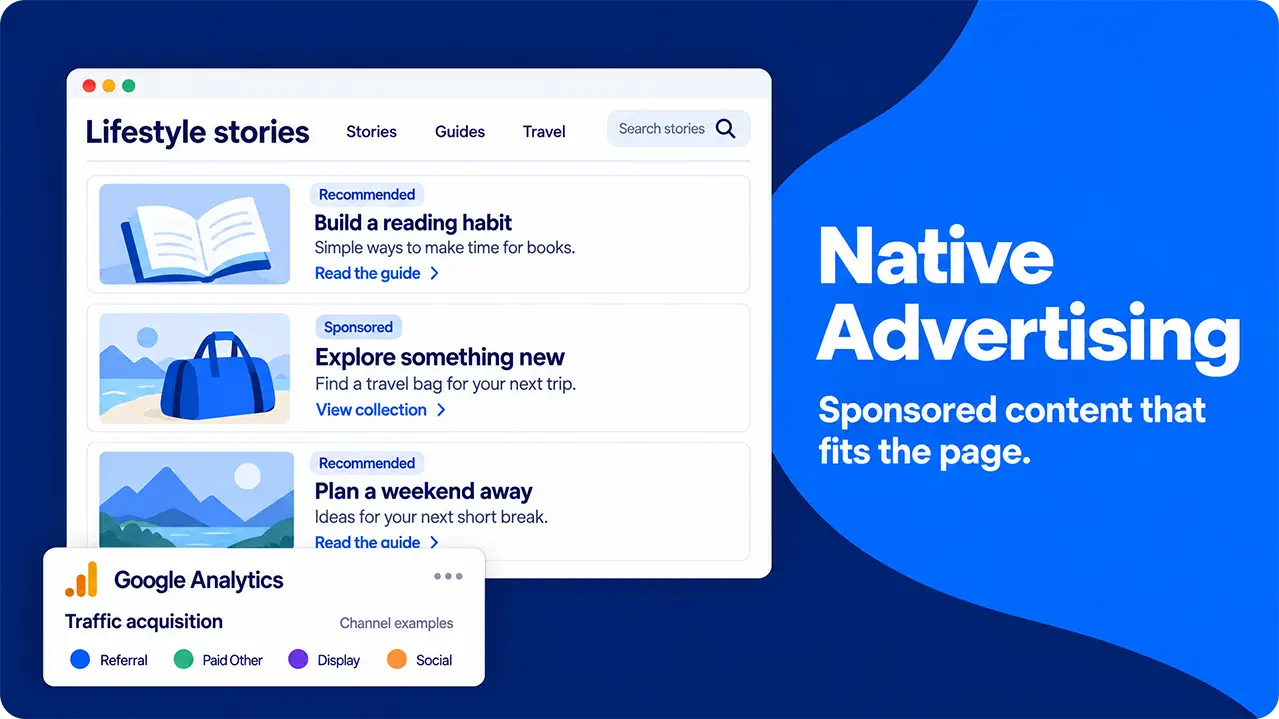
- Reduces Banner Blindness- people are so bombarded with traditional ads that they generally filter out most of them. Native advertising doesn’t look like an ad and generally offers a bit more depth than simply screaming “buy now”, making it great for actually earning some engagement.
- Avoids Annoying Potential Customers- banners and other “intrusive” forms of digital advertising disrupt people’s browsing. Native advertising aims to become part of their browsing.
- High Engagement and Click-Through - By appearing like just another piece of content, native advertising offers far better engagement rates than something like a display ad and can generate a better click-through rate than many other types of paid ads.
- Beats Ad Fatigue- by offering some real value on top of their use as an advert, native ads bypass the habit of viewing adverts as an annoyance and encourage engagement.
- Privacy-friendly and Helps Build Trust- as native ads are related to the type of content that people are already consuming, they don’t rely on privacy-invading cookies and can help build trust with your audience.
- Bypass Ad Blocks- content-based native advertising, such as advertorials, doesn’t trigger ad blockers, so your message is more likely to be consumed.
What Does Native Advertising Look Like In Your Analytics and How Should You Monitor Success?
Native advertising is slightly trickier to track than some other forms of marketing. Exactly how it appears in your analytics will vary from type to type:
- Content-based: For advertorials and other content-based native advertising, you might be limited to checking the referrals to gauge how many people have clicked your links- they’re effectively just posts on their website after all. Whoever hosts your content should be happy to share their metrics with you if you want to dig a little deeper.
- Network-based: For native advertising such as search ads, suggested content ads or similar, they will appear in the Paid Other, Display or Social sections of your reports, depending on where they were displayed.
In terms of measuring the success of a given piece of native advertising, there are a few key metrics to keep an eye on:
- Viewability: A measurement of whether or not 50% of your ad was displayed for a second or more. A higher score here means that there was more chance that your offering was seen and digested by the viewer.
- CTR- setting up a unique URL on each of your native ads, regardless of type, allows you to find out exactly which ones have been most successful.
- Engagement: depending on how you’ve set up your native advertising campaign, you might be able to get insights into bounce rate and other engagement metrics from your partners. These allow you to judge how well people are taking in your messaging.
- Conversion rate: how many people take in your ad and then go on to do the thing you wanted them to.
How to Set Up a Native Advertising Campaign
There are two main ways of getting started with a native advertising campaign: reaching out directly or working with an agency.
If you’re working directly with a host website to create advertorials, simply reach out to them and work out the terms that you’re both comfortable with. They may offer to write them for you or could accept them as a guest post. Work closely with them to ensure that your content matches the tone, purpose and feel of their site while still meeting your advertising goals.
Alternatively, partner with a specialist agency that can cover creating your content and partnerships with distributors on your behalf, while still allowing you to retain control. Most agencies will also give you far more detailed analytics reports, allowing you to refine your efforts more carefully.
If you’re working directly with a host website to create advertorials, simply reach out to them and work out the terms that you’re both comfortable with. They may offer to write them for you or could accept them as a guest post. Work closely with them to ensure that your content matches the tone, purpose and feel of their site while still meeting your advertising goals.
Alternatively, partner with a specialist agency that can cover creating your content and partnerships with distributors on your behalf, while still allowing you to retain control. Most agencies will also give you far more detailed analytics reports, allowing you to refine your efforts more carefully.
Common Mistakes With Native Advertising
While native advertising allows you to reach people when they’re not particularly in the mood to be advertised to, this is as much a potential weakness as a strength. Pushing a “salesy” text on someone who’s simply looking for some information is likely to be a turn-off and result in them navigating away.
A more subtle approach is necessary to get results- aim to inform and entertain the people who are consuming your content rather than push a hard sell on them. Native ads offer a fantastic way to warm up traffic before they even realise that they’re being advertised to.
Another common issue is neglecting the pre-campaign research. You need to have a decent understanding of who you’re targeting, what they want to see and what your competitors are doing before you start creating your campaigns. This allows you to target various buyer personas separately, producing content that appeals to them more directly.
Finally, a lack of transparency often trips up native campaigns. Many countries require adverts to be declared by law, marking them out as not just another piece of content. This applies to paid partnerships with publishers, working with influencers and anything else that might not instantly seem like an advert to someone only glancing at it casually.
A more subtle approach is necessary to get results- aim to inform and entertain the people who are consuming your content rather than push a hard sell on them. Native ads offer a fantastic way to warm up traffic before they even realise that they’re being advertised to.
Another common issue is neglecting the pre-campaign research. You need to have a decent understanding of who you’re targeting, what they want to see and what your competitors are doing before you start creating your campaigns. This allows you to target various buyer personas separately, producing content that appeals to them more directly.
Finally, a lack of transparency often trips up native campaigns. Many countries require adverts to be declared by law, marking them out as not just another piece of content. This applies to paid partnerships with publishers, working with influencers and anything else that might not instantly seem like an advert to someone only glancing at it casually.
3. O tráfego do site diminuiu
Mudanças nos fluxos de tráfego podem acontecer por vários motivos, por isso é importante garantir que seu mix de marketing seja o mais diversificado possível. Para resultados rápidos, considere fazer retargeting de visitantes anteriores por meio de anúncios ou e-mails.
Identificando o problema
Uma queda no tráfego do site aparecerá no seu painel de análise. Os relatórios que você encontrar lá devem informar exatamente quais fluxos mudaram e, a partir daí, você poderá começar a entender por que eles mudaram.
Como corrigir isso
Às vezes, o que estava funcionando parece parar, e o tráfego do seu site cai. Pode haver inúmeras razões por trás disso; as mais comuns são:
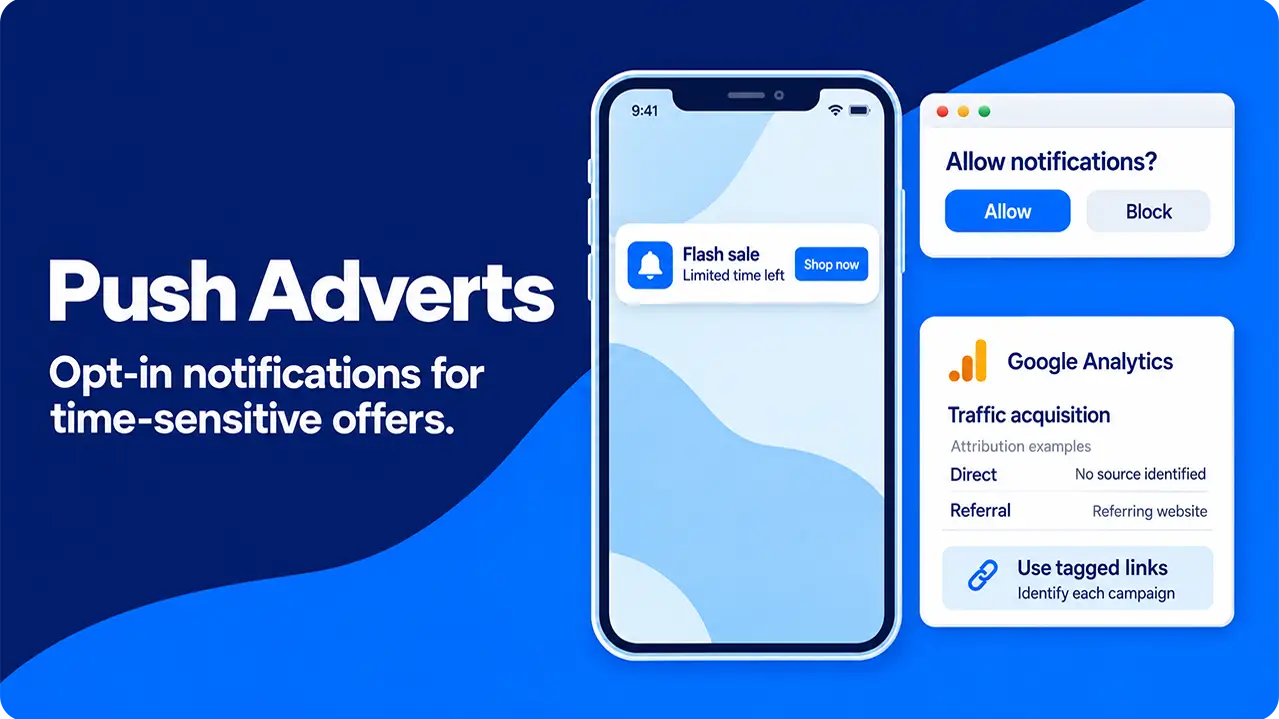
What do Push Ads Look Like In Your Analytics and How Should You Monitor Success?
Google Analytics 4 can track push ads in various ways, depending on how they’re set up.
Ideally, your push ads will link to a “tagged” URL that will allow you to monitor exactly which ads got the responses you were looking for. Without these extra bits of information in the URL, they’re likely to appear as “referral” or “direct” traffic, alongside everyone who manually entered your web address or clicked a link pointing towards your page.
While it may not be quite as accurate as a properly tagged push ad, you can get a good sense of how successful any particular untagged ad has been by comparing your traffic numbers to the time that you sent the push notification out. As the response tends to be quick, a sudden jump that corresponds to your ad hitting people’s phones suggests that it has had the desired effect.
In terms of measuring how successful a particular push ad has been, there are a few metrics to examine, which, as a list-based system, share a lot of ground with email marketing:
Ideally, your push ads will link to a “tagged” URL that will allow you to monitor exactly which ads got the responses you were looking for. Without these extra bits of information in the URL, they’re likely to appear as “referral” or “direct” traffic, alongside everyone who manually entered your web address or clicked a link pointing towards your page.
While it may not be quite as accurate as a properly tagged push ad, you can get a good sense of how successful any particular untagged ad has been by comparing your traffic numbers to the time that you sent the push notification out. As the response tends to be quick, a sudden jump that corresponds to your ad hitting people’s phones suggests that it has had the desired effect.
In terms of measuring how successful a particular push ad has been, there are a few metrics to examine, which, as a list-based system, share a lot of ground with email marketing:
- Mudanças no Algoritmo: mecanismos de busca, redes sociais e IAs se atualizam regularmente, mudando o que priorizam. Seu conteúdo, que antes tinha um bom posicionamento, agora pode estar mais abaixo nas listagens.
- Problemas de rastreamento: Ocasionalmente, atualizar seu site pode causar problemas no seu software de análise. Acesse sua página você mesmo e veja se sua visita foi registrada.
- Concorrentes superando você no ranking: o SEO não fica parado e, se você teve sucesso, seus concorrentes provavelmente perceberam isso e começaram a copiar sua estratégia.
How to Set Up a Push Advertising Campaign
Setting up a push advertising campaign is remarkably straightforward. As they’re best used for time-sensitive messaging, most platforms operate a self-service model, giving you access to the tools you need to send out your push notifications and putting you in total control.
You can target by geographic location, device type and operating system, how long someone has been subscribed to your list for, how active they are on your site and filter by how often they’ve been targeted recently (top tip: don’t bombard people’s phones with notifications too often- they’ll simply unsubscribe and avoid you in future).
Finally, create your notification. You generally have a single, short headline, one line of body and an image to grab attention. Focus on urgency with lines such as “time is running out - shop the sale now” or similar messages.
Depending on the platform you’re using and your goals, you may choose from a variety of different payment models:
You can target by geographic location, device type and operating system, how long someone has been subscribed to your list for, how active they are on your site and filter by how often they’ve been targeted recently (top tip: don’t bombard people’s phones with notifications too often- they’ll simply unsubscribe and avoid you in future).
Finally, create your notification. You generally have a single, short headline, one line of body and an image to grab attention. Focus on urgency with lines such as “time is running out - shop the sale now” or similar messages.
Depending on the platform you’re using and your goals, you may choose from a variety of different payment models:
- Cost per click: similar to most digital advertising- you pay for each click that your notification receives. This is ideal for campaigns that are going out to a lot of recipients, as you only pay for the notifications that got a response.
- Cost per mile: You pay for a set number of deliveries. This is ideal if you’re on a tight budget, as there will be no nasty surprises.
- Cost per action: You only pay for notifications which trigger a specific action (most commonly a sale or a sign-up). This can offer the best ROI, but it comes with limited data on the unsuccessful notifications.
Common Mistakes With Push Adverts
There are three major mistakes that people often make with push adverts that render their campaigns ineffective: not segmenting their audiences, pushing too often and putting out bad texts and images.
Firstly, audience segmentation matters. A generic “visit us now” message sent out to your entire subscriber list is unlikely to tempt anyone to actually visit. Instead, segment your audience by the data that you hold on them. The simplest way to do this is by how long they’ve been subscribed or when they last interacted with your site. This allows you to send a message welcoming recent sign-ups and encouraging them to come back, or retargeting previous customers who haven’t visited recently.
Secondly, while people are glued to their phones, notifications actually trigger a range of responses, from dopamine spikes to anxiety. Targeting the same group repeatedly over too short a time is likely to push their response towards the negative end of this spectrum and result in them blocking further notifications from you.
Lastly, with only a few words and a single image to convey your message, it pays to ensure that every single word is serving a purpose. It’s commonly said amongst copywriters that short-form content is harder to write than long-form for this very reason. An overly generic Call to Action is unlikely to gain much response, but getting too targeted will exclude a large proportion of your potential reach.
Firstly, audience segmentation matters. A generic “visit us now” message sent out to your entire subscriber list is unlikely to tempt anyone to actually visit. Instead, segment your audience by the data that you hold on them. The simplest way to do this is by how long they’ve been subscribed or when they last interacted with your site. This allows you to send a message welcoming recent sign-ups and encouraging them to come back, or retargeting previous customers who haven’t visited recently.
Secondly, while people are glued to their phones, notifications actually trigger a range of responses, from dopamine spikes to anxiety. Targeting the same group repeatedly over too short a time is likely to push their response towards the negative end of this spectrum and result in them blocking further notifications from you.
Lastly, with only a few words and a single image to convey your message, it pays to ensure that every single word is serving a purpose. It’s commonly said amongst copywriters that short-form content is harder to write than long-form for this very reason. An overly generic Call to Action is unlikely to gain much response, but getting too targeted will exclude a large proportion of your potential reach.
4. O tráfego está crescendo, mas o site atrai as pessoas erradas
Nem todo tráfego tem o mesmo valor. Considere dedicar tempo ao seu SEO local e a anúncios segmentados, dependendo de quem compõe o seu tráfego mais relevante.
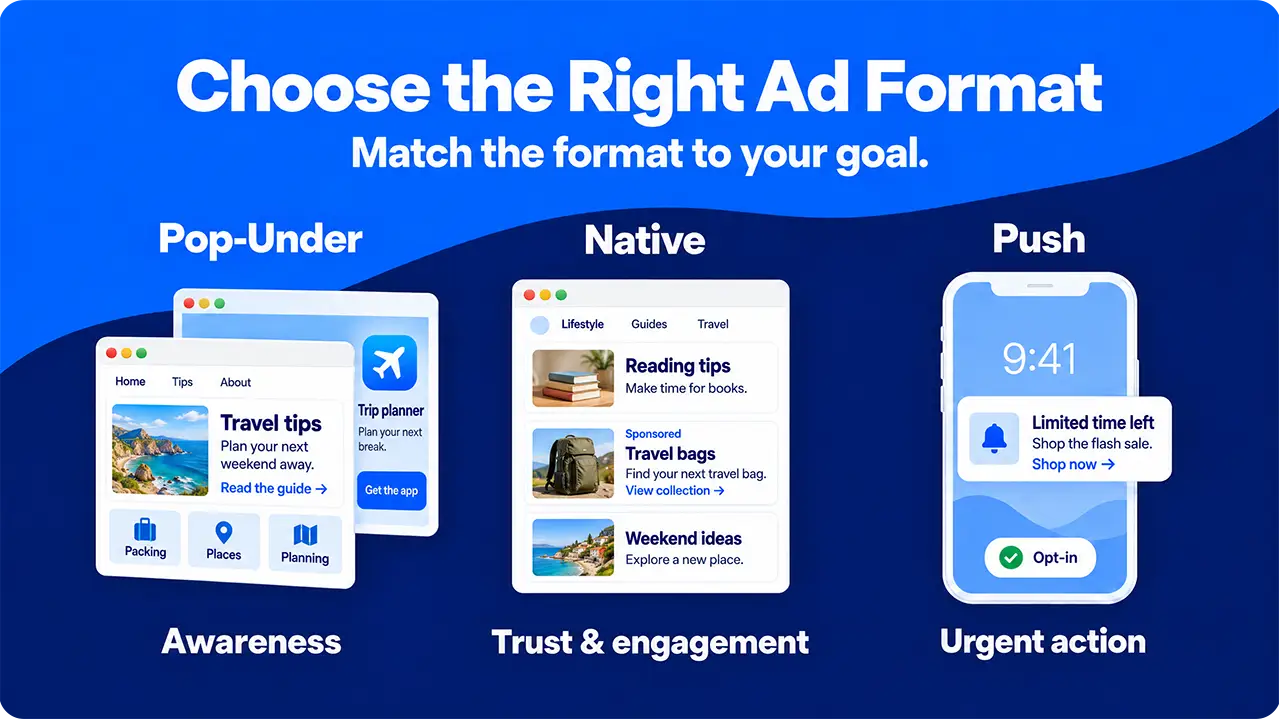
Advertising type
Cost
Targeting
Best For
Main Weaknesses
Main Strengths
Intrusitiveness
Pop-Under
Low
Targeted by browser, location and device type
Mass appeal and awareness building
Low user intent results in poor CTRs
Allows a gentle “warming” of potential traffic, meaning they are ready to sign up when they visit.
Relatively low: waits for viewer to finish what they were doing
Native
High initial costs
Vague targeting by interest and curiosity
Awareness and trust building with engaged audiences
Expensive to create and often slow to get publisher approval
Allows a detailed exploration of a topic and avoids the “hard sell” which can turn off customers
Low: appears as a natural piece of content
Push
Varies depending on pricing model selected.
Target by location, age of subscription and previous interactions
Quick results and time-sensitive messages
High opt-out rate and limited content length
Allows urgent messages to be sent and can generate instant results
High: triggers an alert on the desktop or mobile device they’re pushed to
Se as suas análises mostram um número crescente de visitantes, mas você não está vendo um aumento correspondente nas vendas e nos cadastros, seu site pode estar atraindo as pessoas erradas. Depois de identificar esse problema, você pode começar a reestruturar seus esforços de marketing e direcioná-los de forma mais precisa para um tráfego relevante.