.webp)


.svg)


.svg)
.svg)
More than half of all web traffic is generated by bots, according to Wikipedia's overview of internet bots. Some of that automation keeps the web running. Search engine crawlers index your pages, and uptime monitors confirm that your checkout still loads at 3 a.m.
A growing share of automated traffic does something else. It imitates people, inflates your numbers and drains advertising budgets that were meant for real customers. Juniper Research estimated that ad fraud cost advertisers $88 billion in 2023, and much of that fraud runs on automated visits and clicks.
For you as a marketer, the larger cost is often invisible. Budgets, content plans and landing page decisions can rest on visits that no human ever made.
This guide explains what a traffic bot is, why bot traffic exists, and how you can spot it in your analytics and server logs. We move from definitions to a practical detection routine and then to advanced audit habits. One principle runs throughout: search engines and AI systems read your pages, but the audience that matters is always real people.
What Is a Traffic Bot?
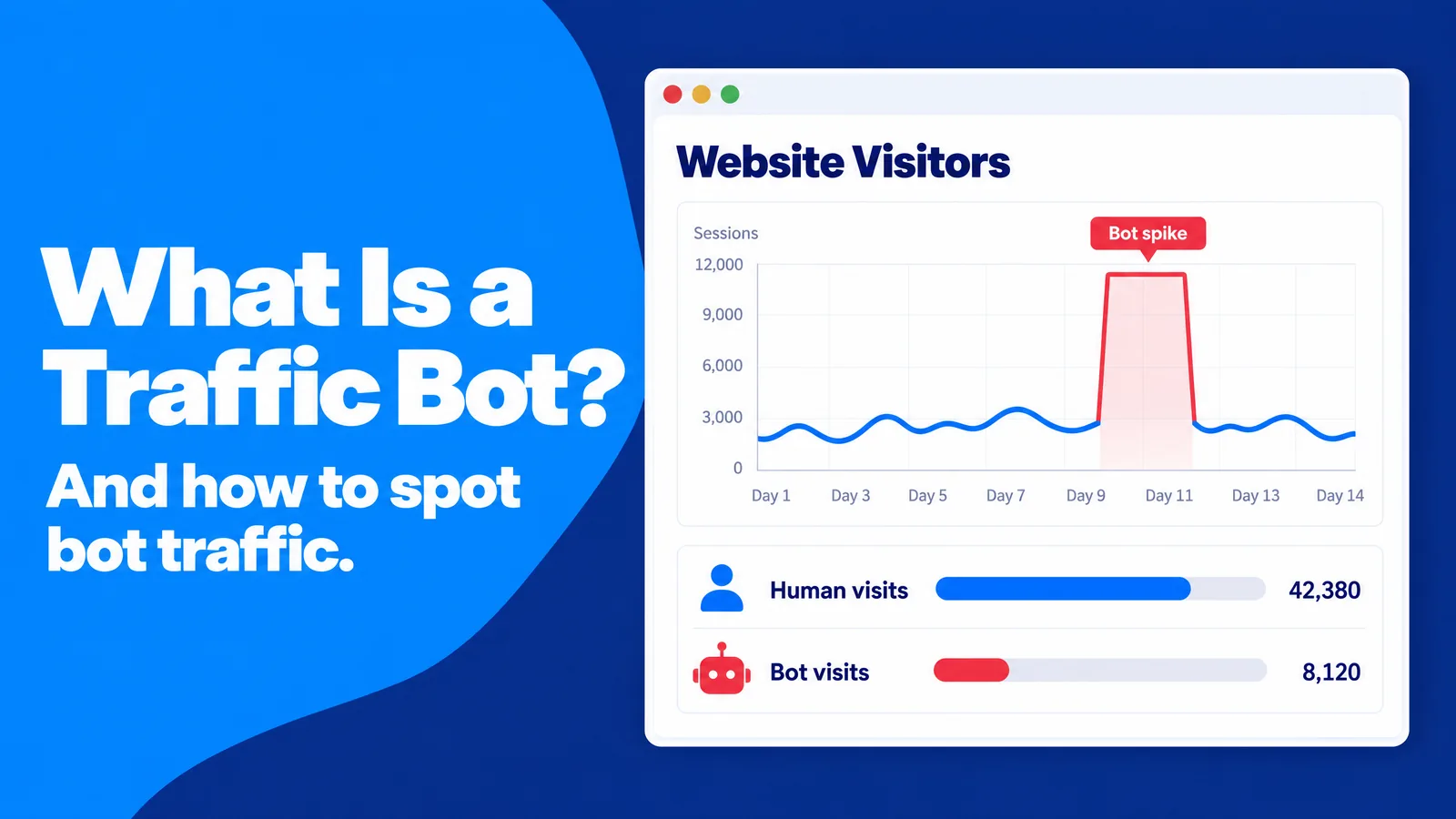
The term "traffic bot" is used loosely, and that creates confusion before any analysis starts. A developer may use it for a load-testing script. A seller on a freelance marketplace may use it for software that promises "10,000 visitors a day". A security team may use it for anything that is not a person, and when three people in a meeting mean three different things, the team argues about labels instead of fixing the problem.
In this guide, a traffic bot is a software program that sends automated visits to a website, app or ad so that the activity looks like it came from people. Its purpose is usually to inflate a metric such as page views, ad impressions, clicks, video views or followers. A traffic bot is one type of internet bot, a software application that runs automated tasks over the internet.
Traffic Bot vs. Bot Traffic
Bot traffic is the wider category. It covers every visit or request that a program makes instead of a person, whatever the intent. When Googlebot crawls your blog, that is bot traffic. Nobody would call Googlebot a traffic bot, though, because it announces itself, follows your crawl rules and does not pretend to be a shopper.
The difference shapes your response. Bot traffic from a declared crawler calls for management: you decide what it may access. Visits from a traffic bot call for detection and exclusion, because the whole point of a traffic bot is to blend in with your human visitors.
Good Bots, Bad Bots and the Gray Zone
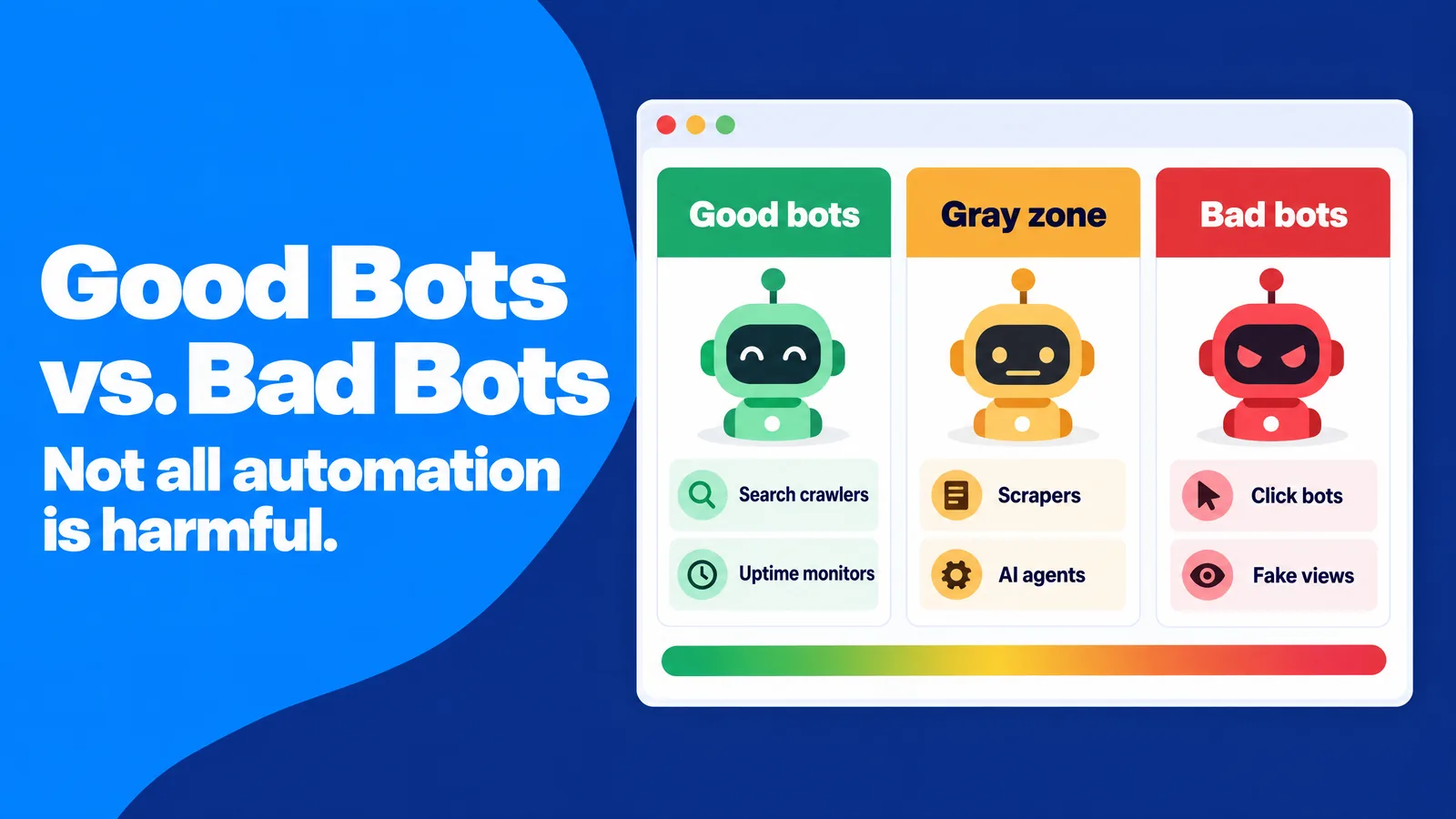
The advertising industry has a useful vocabulary for this. The Media Rating Council (MRC), the US body that accredits advertising measurement, divides invalid traffic into two groups in its invalid traffic standards:
- General invalid traffic (GIVT): known crawlers, data-center traffic and other automation that list-based filters can catch.
- Sophisticated invalid traffic (SIVT): bots that imitate human behavior, hijacked devices, malware and incentivized activity, which require deeper analysis to identify.
Between the clearly good and the clearly bad sits a gray zone. Price-monitoring scrapers, SEO tool crawlers, AI training crawlers and AI agents that browse on behalf of a person are all automated. Whether they are welcome depends on your business model, not on a universal rule.
Common Types of Traffic Bots
Traffic bots come in a few recognizable families. Knowing them helps you guess which one you are facing from the pattern it leaves:
- Click bots click ads or search results to drain a competitor's budget or fake engagement, a practice known as click fraud.
- Impression bots load ads on fake or disguised pages so that advertisers pay for views that no one saw.
- Autosurf and traffic exchange programs rotate pages between members so every site logs "visits" that nobody reads.
- Referrer spam bots plant a URL in your referral reports to bait you into visiting it, a tactic called referrer spam.
- Headless browsers are full browsers without a screen. Developers use them for testing, and fraudsters have misused them to inflate ad impressions.
- Click farms use low-paid people instead of code. The visitors are technically human, but the intent is fake, so measurement standards treat the activity as invalid.
Practical step: A useful first step is a one-page inventory of the automation you invite. It lists your search crawlers, uptime monitors, SEO crawlers, payment webhooks and the AI assistants you want citations from, with the user agent each one declares. This works because many false alarms come from your own tools: an SEO crawl scheduled for 3 a.m. looks exactly like a suspicious night-time spike until you check the inventory.
Why Real Visitors Leave a Recognizable Footprint
Most advice on bot traffic starts with what looks wrong. A more reliable starting point is what normal looks like, because you cannot judge an anomaly without a baseline.
Human visitors are wonderfully inconsistent. One person reads your pricing page on a phone during a commute for 40 seconds. Another leaves a desktop tab open for 12 minutes, and a third leaves after two seconds because they tapped the wrong result.
That messiness is the strongest signal you have. Every human visit carries dozens of small variations: screen size, browser version, time zone, scroll speed, the pause before a click. Automated traffic struggles to copy that full variety at scale, because each new variation costs the bot operator engineering time and infrastructure. A bot network can fake one or two dimensions convincingly, but faking all of them at once, for thousands of sessions, is expensive.
SparkTraffic, an advertising platform that has delivered geo-targeted website visits through ads on partner publisher sites since 2015, builds on this variety principle in a five-check test it publishes for its own advertisers. The reasoning is simple: anyone who pays for visits should be able to confirm, with standard analytics and without special tools, that those visits behave like people. The same checks work for any source, paid or organic, so they make a good general-purpose baseline for your own reports.
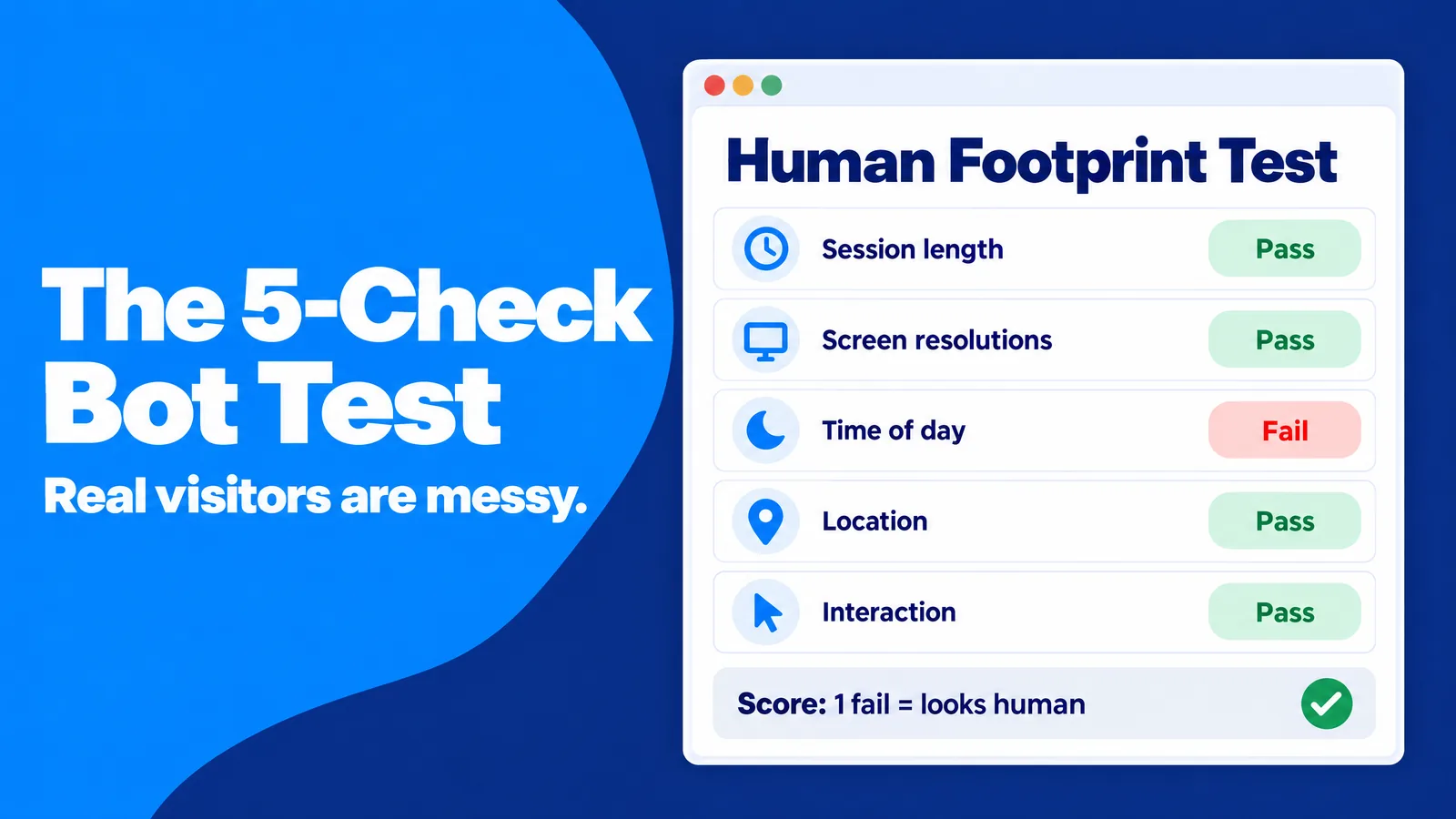
The Five-Check Human Footprint Test
Each check compares one dimension of behavior with the variety you would expect from real people. The thresholds are deliberately loose, so small samples and normal fluctuations do not trigger false alarms:
- Session length: healthy traffic spreads from under 10 seconds to over two minutes. A warning sign is more than half of sessions landing in the same five-second range.
- Screen resolutions: healthy traffic shows many different resolutions. A warning sign is one resolution accounting for more than half of sessions.
- Time of day: healthy traffic follows local daytime patterns. A warning sign is 1 a.m. to 5 a.m. local time matching daytime levels.
- Location: healthy targeted traffic sends more than 90% of visits from the targeted area. A warning sign is more than 10% arriving from places you did not target.
- Interaction: healthy traffic includes some scrolls, clicks or form starts. A warning sign is zero interactions across 300 sessions.
Zero or one failed check suggests the traffic behaves like people. Two or more failures are a reason to pause the source, export around 20 sessions as evidence and ask the provider for a review. This scoring works because a single odd metric often has an innocent cause, such as a mobile-only campaign that narrows screen sizes, while several failures at once rarely do.
Build Your Own Human Baseline
Generic thresholds are a starting point, not a verdict. A recipe blog, a SaaS documentation site and a local dentist all have different session lengths and daily rhythms. A five-minute average session might be suspicious on a store locator page and perfectly normal on a long tutorial.
Practical step: The most reliable benchmark is one channel you already trust, such as newsletter clicks or logged-in customers. Recording its distribution for the five dimensions above over 30 days gives you a baseline, and any new source that looks odd can be compared with it instead of with an industry average. This works because your trusted channel already reflects your audience, your devices and your time zones, so a large deviation points to the source rather than to your site.
Why Traffic Bots Exist and What They Cost You
Traffic bots exist because someone profits from fake activity. The profit can be direct, as in ad fraud, or indirect, as in a vendor who sells "traffic" that makes a dashboard look busy. Understanding the motive helps you predict the pattern: a fraudster wants impressions and clicks, a vanity-metric seller wants page views, and a spammer wants your attention.
Ad Fraud at Industrial Scale
The best-documented example is Methbot. According to the US Department of Justice, the operation used more than 1,900 servers and more than 650,000 IP addresses to load ads on over 5,000 spoofed websites, collecting more than $7 million. A related scheme, 3ve, ran on about 1.7 million infected computers and took more than $29 million.
The bots were built to look human. The DOJ's sentencing announcement describes bots that faked mouse movements, scrolling and social network logins, and the main operator received a 10-year prison sentence. The lesson for marketers is that "realistic engagement" alone proves nothing, because Methbot was engineered to produce exactly that.
Fake Popularity and Vanity Metrics
A second motive is the appearance of popularity. Some vendors sell traffic bot software or "visitor packages" that inflate page views, video views or follower counts. In the early web, raw hit counters impressed people, and inflated numbers had a short-term payoff. Today, search engines, advertisers and investors look at engagement, conversions and revenue, so fake volume buys nothing and contaminates the data you need.
Regulators now treat fake popularity as deception. In August 2024 the US Federal Trade Commission finalized a rule that bans selling or buying fake indicators of social media influence, such as followers or views generated by bots. The ban applies when the buyer knew or should have known the indicators were fake and used them for a commercial purpose. Google's advertising policies also prohibit promoting services that sell falsified user activity, such as invalid clicks.
Referrer Spam and Ghost Traffic
A third motive is attention. Referrer spam bots visit your site, or send data straight to your analytics property, with a fake referring URL. When you see an unfamiliar domain in your referral report, curiosity does the rest, and the spammer gets a visit or a sale. Wikipedia's article on referrer spam describes how this tactic moved from server logs into analytics tools.
The Real Cost: Decisions Built on Fake Data
The direct cost of bot traffic is wasted ad spend and server load. The indirect cost is usually larger. Imagine an A/B test where variant B receives 600 extra bot sessions with zero conversions: B's conversion rate drops, you keep the weaker page, and nobody ever learns why. Or imagine a content team that doubles down on a topic because a scraper crawled those articles every hour.
Practical step: A contamination cost estimate makes the problem concrete. It multiplies the share of sessions that failed two or more of the five checks by your paid media spend for the quarter. It then lists every decision (budget shifts, test winners, content priorities) that relied on those reports. This works because it turns an abstract data-quality issue into a budget figure, which makes it far easier to get time and tools approved.
How to Spot Bot Traffic in Google Analytics 4
Google Analytics 4 (GA4) already excludes known bots automatically, using Google's own research and the IAB/ABC International Spiders and Bots List. You cannot switch this off, and you cannot see how much traffic it removed. That sounds reassuring, but it means the bots left in your reports are, by definition, the ones that are not on any list. Bot traffic detection beyond that list is your job.
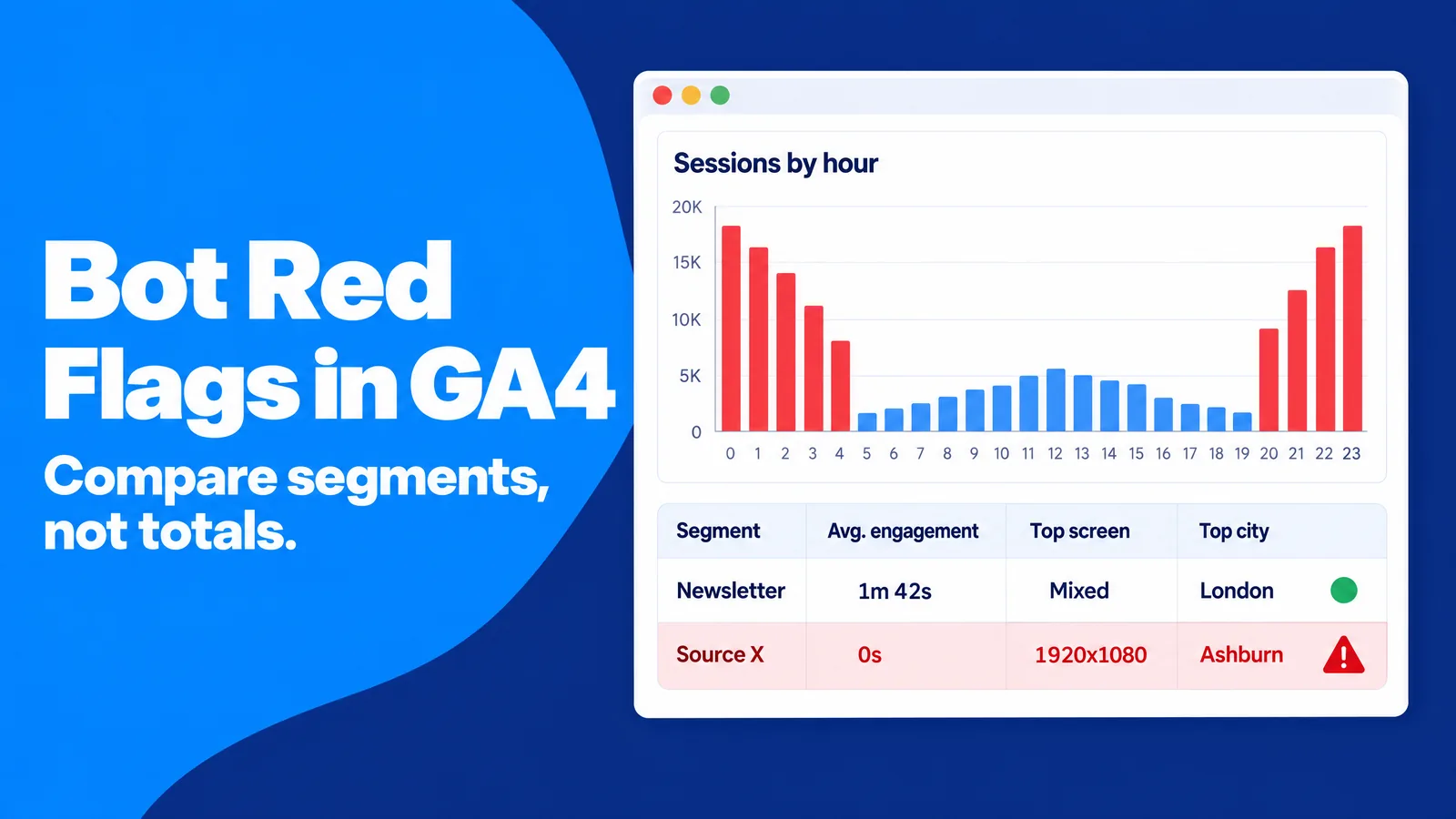
The good news is that unknown bots still leave patterns. They tend to arrive in bursts, use a narrow set of devices, ignore your conversion paths and cluster in places where your customers do not live. You identify bot traffic by comparing segments, not by staring at totals.
Start With the Shape of the Spike
Natural traffic spikes have a cause and a shape. A newsletter, a social post or a press mention produces a sharp rise followed by a gradual decay over hours or days, and conversions rise with it. Bot spikes often look different: flat-topped plateaus, starts and stops at round hours, and sessions that climb while key events stay flat.
When a spike appears, the first question is "what happened at that moment?" If no campaign, mention or seasonal event explains it, the spike is best treated as unverified until the segment comparison below says otherwise.
Eight Red Flags in Your Reports
These patterns are worth checking whenever a source or landing page looks unusual:
- Engagement time near zero: many sessions with almost no engagement time, or durations clustered in the same few seconds.
- Direct or Unassigned spikes: sudden growth in Direct or Unassigned traffic to a landing page that is not linked anywhere obvious.
- Unknown hostnames: hits recorded on domains that are not yours, which happens when someone copies your measurement ID onto another site.
- One device profile: a single screen resolution, browser version or operating system dominating a source.
- Data-center locations: clusters in cities known for server farms, such as Ashburn, Virginia, instead of where your customers live.
- Night shift traffic: 1 a.m. to 5 a.m. local volume equal to daytime volume.
- Strange referrers: unfamiliar domains, especially ones that advertise SEO or traffic services.
- Flat conversions: sessions rising while sign-ups, purchases or qualified leads stay flat, or form submissions full of gibberish.
Build a Bot Investigation Exploration
GA4's Explore section lets you build a reusable report for this work. A free-form exploration with the right dimensions answers most questions in minutes, and a saved template means the next investigation does not start from scratch:
- Setup: a free-form exploration with the dimensions session source / medium, landing page, hostname, screen resolution, city and hour.
- Metrics: sessions, engaged sessions, average engagement time per session and key events.
- Segments: one for the suspicious source and one for your trusted baseline channel.
- Comparison: the two segments side by side, dimension by dimension, using the five checks as a guide.
- Evidence: an export of about 20 suspicious sessions with their attributes, ready to share with a provider or ad platform.
This approach works because bots rarely fail on a single dimension in isolation. Side-by-side segments make the narrow device profile, the odd hours and the missing conversions visible at the same time. Our guide on using analytics to improve your web traffic covers the core GA4 reports, and the guide to AI traffic attribution explains how to read Direct traffic without jumping to conclusions.
Use GA4 Data Filters With Care
Data filters are the main way to exclude bot traffic in GA4 once you know where it comes from. They can remove internal traffic, developer traffic and, more recently, hits from hostnames you do not own. A hostname filter that includes only your own domains is a clean fix for measurement IDs copied onto other sites. Filters are powerful but unforgiving: once a filter is active, the excluded data is gone for good.
Practical step: The safest habit is to run every new filter in Testing mode for at least a week and compare filtered and unfiltered results before activating it. This protects you from deleting real customer data because of a typo in a domain name or an overly broad rule.
How to Verify Bots at the Server Level
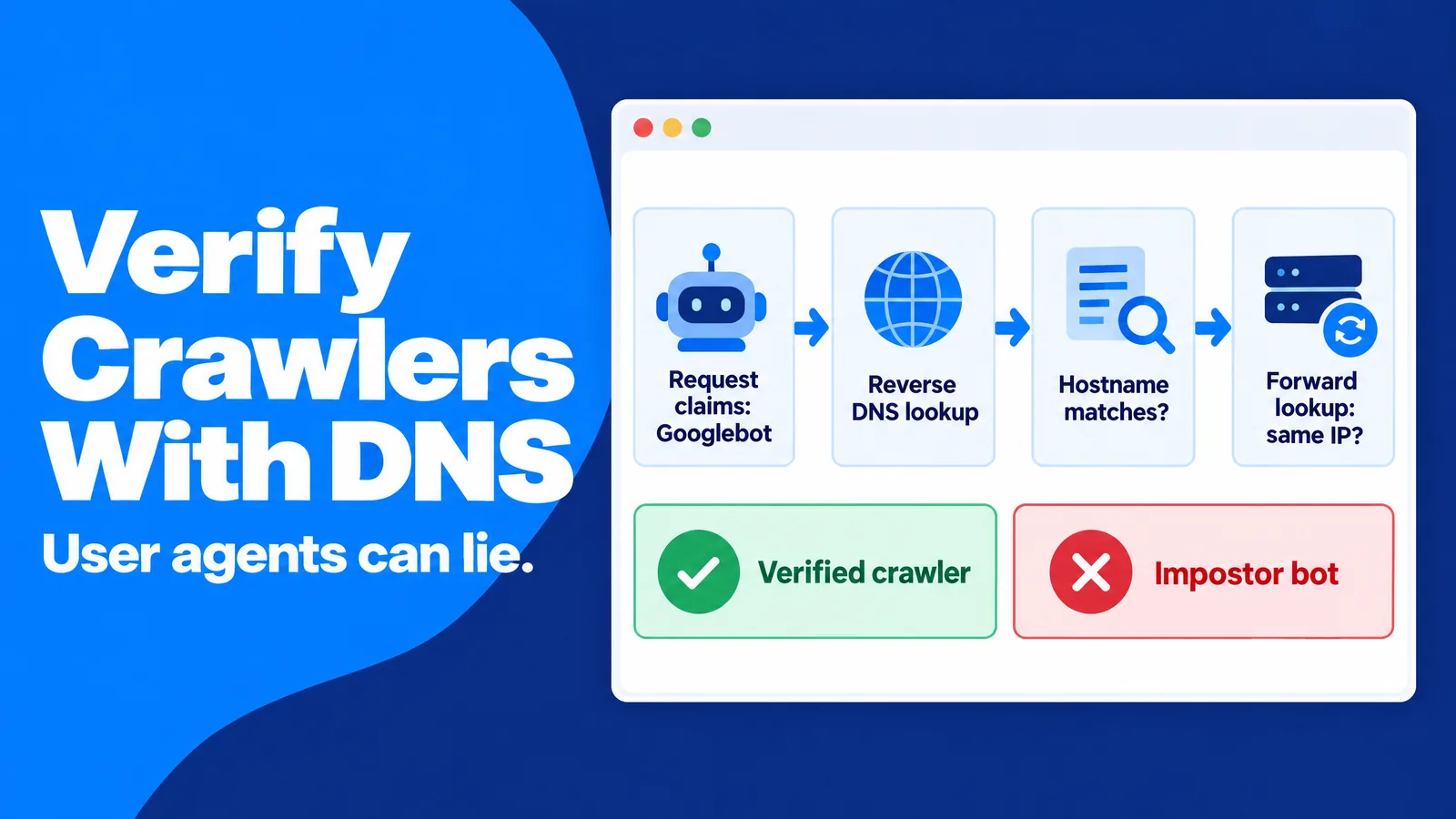
Analytics tools only see visitors that run your tracking code. Many bots never execute JavaScript, so they never appear in GA4, yet they still consume bandwidth, scrape content and probe login forms. Your server logs, CDN logs or hosting dashboard show every request, which makes them the place to confirm who is really visiting.
Why User Agents Prove Nothing
Every request carries a user agent string that names the browser or bot. The catch is that the visitor writes it. A scraper can claim to be Googlebot, Chrome on an iPhone or anything else with one line of code, so treating the user agent as identity is like accepting a name tag as a passport.
Confirm Crawlers With Forward-Confirmed Reverse DNS
The standard way to check a self-declared crawler is forward-confirmed reverse DNS. It takes two lookups. A reverse DNS lookup on the visitor's IP address returns a hostname, which must belong to the claimed operator's domain. A forward lookup on that hostname must then return the same IP address, so a fake Googlebot fails because its IP address does not resolve back to Google's domains.
Practical step: A monthly log sample keeps this manageable. Pulling the 20 user agents that made the most requests and running the check on any that claim to be a search engine or a major AI crawler takes a few minutes. This works because impostors concentrate where the reward is highest: pretending to be a trusted crawler is the easiest way past rate limits and firewalls.
Robots.txt Is a Request, Not a Lock
The robots.txt file tells crawlers what they may access, and the format is standardized in RFC 9309. Compliance is voluntary. Well-behaved crawlers respect it, while traffic bots and many scrapers ignore it or change their names to slip past blocks.
Robots.txt is still useful, because it separates bots that respect your rules from bots that do not. Wikipedia notes that 306 of the 1,000 most-visited websites blocked OpenAI's GPTBot in 2023, which shows how site owners now use the file as a policy statement. A bot that requests pages you have disallowed has told you something important about its intent.
Signed Bot Identity Is Coming
The long-term fix for impersonation is cryptographic identity. The Internet Engineering Task Force (IETF) has chartered a Web Bot Auth working group to standardize how bots can prove who they are, building on HTTP Message Signatures. A signed bot attaches a verifiable signature to each request, so a website can confirm its operator without relying on IP lists. Following this work now helps you plan which automated visitors you will allow once signatures become common.
How to Stop Bot Traffic Without Blocking Real People
Blocking bots sounds simple until real customers get caught in the net. Aggressive CAPTCHA walls frustrate people on slow phones and create barriers for users of assistive technology. Blanket country or data-center blocks can lock out travelers, corporate VPN users and privacy-conscious visitors, and every false positive is a lost lead that never appears in any report.
A modern approach also has to account for helpful automation. AI assistants increasingly fetch pages, compare products and fill in forms on behalf of a person. Treating every non-human request as hostile can cut you off from visits that a real customer asked for.
Match the Response to the Bot
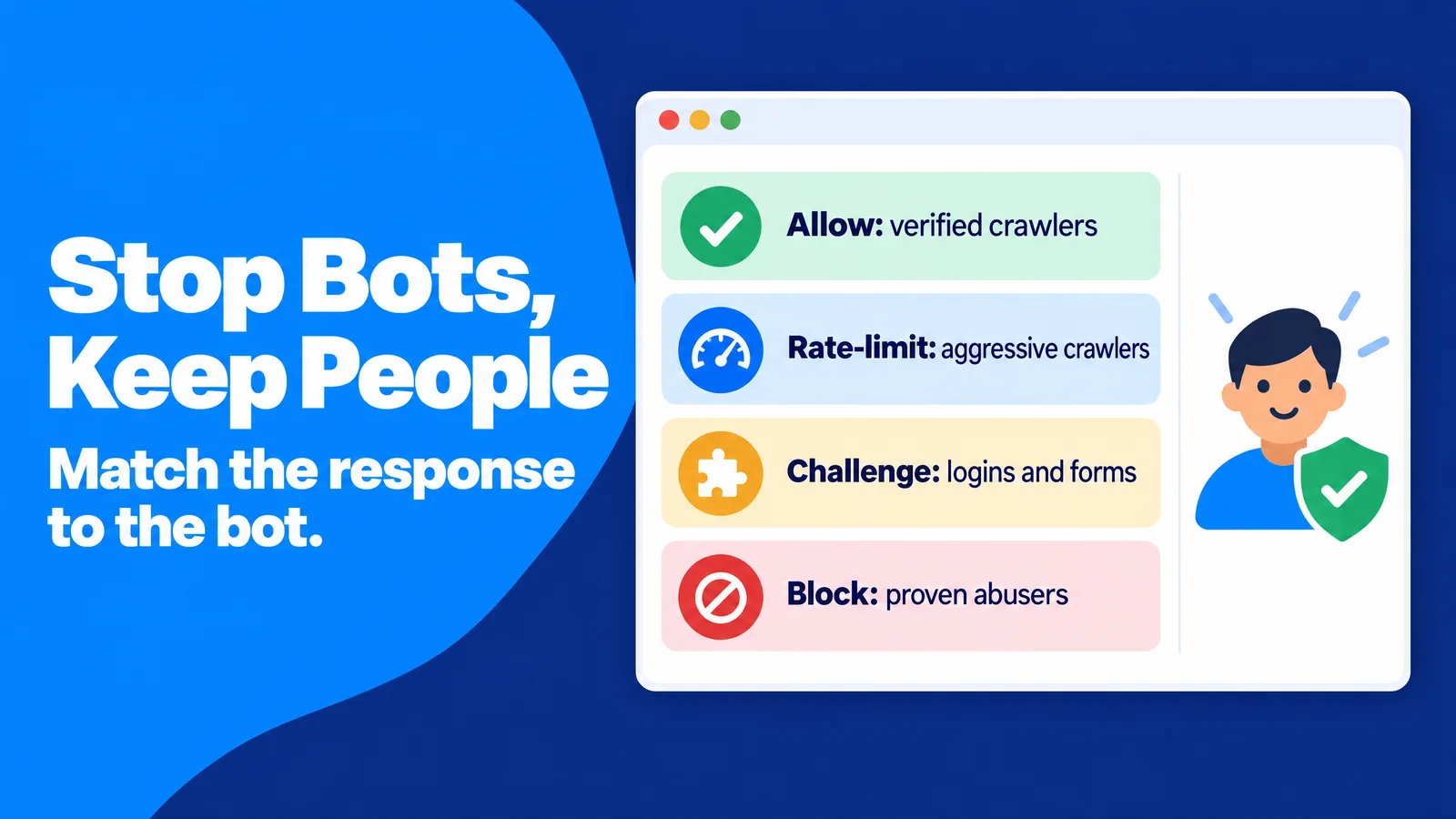
The most effective defenses are graded rather than all-or-nothing. Each type of automated visitor gets the lightest response that solves the problem:
- Verified crawlers you want: allowed, because they bring search visibility and AI citations.
- Aggressive but legitimate crawlers: rate-limited, which protects server performance without breaking anything.
- Unverified traffic on sensitive pages: challenged with a CAPTCHA or a similar test only on logins, sign-ups and checkout, where the cost of abuse is highest.
- Proven abusers: blocked by IP range, network or signature once the evidence is clear.
This grading works because it concentrates friction where abuse causes real damage and keeps the rest of your site fast and open for people.
Protect Forms, Sign-Ups and Checkout
Forms are where bots do the most lasting harm. Fake sign-ups pollute your CRM, trigger welcome emails to addresses that bounce and damage your sender reputation. Fake leads waste sales time and distort cost-per-lead reports.
Practical step: A simple first layer is a honeypot field: a form field hidden from people but visible to bots, so any submission that fills it can be rejected. Server-side validation, rate limits per IP address and double opt-in for email lists add further layers. This setup works because each layer stops a different kind of bot, while a real person never notices any of them.
Leave a Door Open for AI Agents That Act for People
Some automated visits now represent real demand. An AI agent that checks your prices or books a demo for a user is a customer interaction carried out by software. Blocking it outright may cost you a sale, while letting it through unexamined may distort your engagement metrics.
The practical middle ground is to identify these agents separately, allow them on public pages and measure them in their own segment. Our guide to agentic AI traffic explains how agent-assisted visits show up in analytics and how to prepare your pages for them.
How to Keep Paid Traffic Campaigns Clean
Paid traffic is where bot traffic hurts your budget most directly. Every invalid click or impression is money spent on nobody. The risk is highest with cheap, broad inventory and with vendors that cannot say where their visits come from, because their incentive is volume, not outcomes.
Some offers are traffic bots in disguise. Warning signs include promises of "undetectable" or "real-looking" visits, guaranteed search ranking improvements, unlimited visitors for a flat fee and residential proxy networks presented as a feature. Legitimate advertising platforms talk about targeting, placements, landing page review and measurement instead. Buying bot visits backfires every time: the visits never convert, they corrupt your tests, ad networks may ban monetized sites that receive them, and the purchase itself may break consumer protection rules.
Tag Every Paid Source
Untagged paid traffic blends into Direct and Referral, where bots hide easily. UTM parameters are tags added to a link that tell your analytics tool exactly which source, campaign and placement sent a visit.
Practical step: A simple UTM rule solves most attribution gaps: every paid campaign gets its own source, medium and campaign values, recorded in a shared naming sheet. This works because the five-check test needs a clean segment to run on, and if paid visits are mixed into Direct, you cannot tell which vendor sent the suspicious sessions.
Run a Small Test Before You Scale
A small test budget tells you whether a source behaves like people before you commit real money. A few hundred sessions are enough to run the five checks, and a week of data shows daily rhythms. The same discipline improves your landing page work, as our guide on A/B testing a landing page with paid traffic shows.
Ad formats matter too. Popunder, native and push traffic each produce different engagement patterns, because a popunder visitor behaves differently from someone who chose to click a native ad. Judging each format against its own baseline avoids false alarms.
Treat Refund and Credit Policies as Quality Signals
Reputable platforms expect you to check their traffic and explain what happens when something looks wrong. A good platform has a clear process: what evidence it needs, how it reviews a report and whether it credits invalid activity. A vendor that refuses any review, or claims its traffic is "100% human", is telling you something. Even the MRC avoids calling filtered traffic "human" and prefers the word "valid", because no filter can guarantee that every remaining visit is a person.
Advanced Strategy: Run a Monthly Bot Traffic Audit
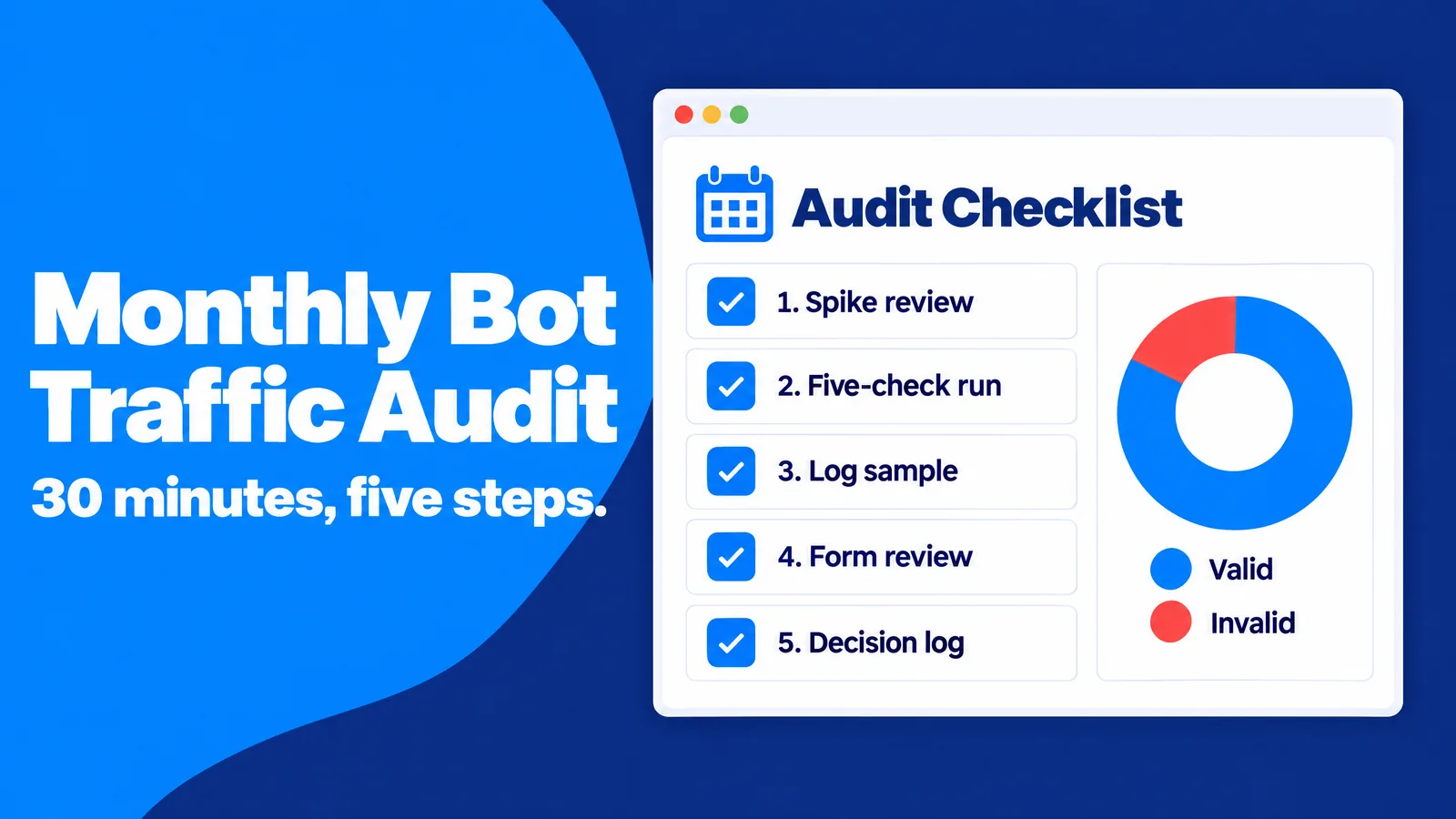
One-off investigations fix one-off problems. Bots change, campaigns change and your own tools change, so a short monthly routine catches problems before they distort a quarter of decisions. The goal is not zero bot traffic, which is impossible. The goal is known, measured and documented bot traffic.
A 30-Minute Monthly Routine
A recurring audit works best when it follows the same steps every time, so trends become visible:
- Spike review: every traffic spike from the past month annotated with its cause, or marked as unexplained.
- Five-check run: each major source and campaign scored against the five checks.
- Log sample: the top claimed crawlers verified with forward-confirmed reverse DNS.
- Form review: sign-ups and leads checked for identical names, disposable email domains or sudden bursts.
- Decision log: a record of what you filtered, blocked or reported, and why.
This routine works because it turns bot detection into a habit with a paper trail. When a stakeholder asks why the March numbers changed, you have the answer.
Write a One-Page Invalid Traffic Policy
Even experts struggle to define invalid traffic precisely. The Tuzhilin Report, an independent review of Google's click-fraud detection described in Wikipedia's article on click fraud, concluded that "there is no conceptual definition of invalid clicks that can be operationalized" except for obvious cases. If the industry cannot agree on one definition, your team benefits from its own.
Practical step: A one-page policy settles most arguments in advance. It states which automated visitors you allow, which thresholds trigger a review, who decides and how findings are reported to agencies and vendors. This works because a written rule replaces case-by-case debates, and it gives partners a clear standard to meet.
Watch the Metrics Bots Cannot Fake Cheaply
Page views and sessions are cheap to fake. Revenue, qualified leads, repeat purchases, support tickets and returning logged-in users are expensive or impossible to fake at scale. A traffic source that adds sessions but never moves these numbers deserves scrutiny, however good its engagement looks.
Anchoring your reporting on these outcome metrics is the strongest long-term defense. It aligns every traffic decision with what people actually do, and it removes the incentive for anyone in your supply chain to pad the numbers.
Frequently Asked Questions About Traffic Bots
What is a traffic bot in simple terms?
A traffic bot is software that visits websites or clicks ads automatically to make the activity look like it came from real people. It usually inflates metrics such as page views, clicks, video views or followers.
Is all bot traffic bad?
No. Search engine crawlers, uptime monitors and many AI crawlers are useful. Bot traffic becomes a problem when it pretends to be human, wastes ad spend, scrapes content against your rules or distorts your analytics.
Can bot traffic hurt my SEO?
Fake visits do not improve rankings, because search engines rely on many quality signals rather than raw visit counts. Bot traffic can still hurt indirectly by slowing your server, copying your content and leading you to optimize the wrong pages based on polluted data.
Does Google Analytics 4 filter bot traffic automatically?
Yes. GA4 excludes known bots and spiders automatically, and you cannot disable this or see how much it removed. Unknown and sophisticated bots can still reach your reports, so segment comparisons and the five checks remain necessary.
How much bot traffic is normal?
There is no universal number. More than half of all web traffic is automated, but most of it never runs your analytics code. A practical benchmark is your own trusted baseline channel: sources that deviate strongly from it deserve a closer look.
How do I stop bot traffic on my website?
The most effective approach is graded. Verified crawlers are allowed, aggressive crawlers are rate-limited, unverified traffic is challenged only on logins and forms, and proven abusers are blocked. Honeypot fields, server-side validation and GA4 hostname and internal traffic filters keep both your forms and your reports clean.
How can I tell if my website traffic comes from bots?
The quickest way is to compare a suspicious source with a channel you trust across five dimensions: session length, screen resolutions, time of day, location and interaction. Two or more clear failures, such as identical session lengths and night-time volume equal to daytime volume, strongly suggest automated traffic. Server logs and forward-confirmed reverse DNS then confirm whether self-declared crawlers are genuine.
Is it legal to buy bot traffic?
Rules vary by country, but buying fake engagement for commercial use carries real legal and business risk. In the United States, the FTC's 2024 rule bans buying or selling fake indicators of social media influence, such as bot-generated followers or views, for commercial purposes. Advertising networks also ban fake traffic in their policies.
Conclusion: Measure for People, Not for Counters
Traffic bots exist because fake activity is cheap to produce and easy to sell. Your defense is a clear picture of what real people look like on your site. The five checks, a trusted baseline, server-level verification and a monthly audit give you that picture without expensive tools.
The old web rewarded big numbers. The current web rewards trust: search engines, advertisers, AI systems and customers all respond to genuine engagement. When you protect your data from bots, you protect every decision that depends on it, and you keep your attention on the audience that buys, subscribes and returns: real people.