.webp)


.svg)


.svg)
.svg)
1. Intro
Your website is ranking poorly on Google and you’re wondering how to start with SEO Traffic? Stay tuned and read until the end.
2. What is SEO Traffic and how it helps SEO?
SEO Traffic is the amount of visits your website receives that can benefit you with SEO purposes. That is, to rank higher on search engines such as Google and Bing.
For example: imagine you own a Christmas sweater shop, and whenever someone in your area searches for Christmas sweater on Google, your website appears on result number 15. Each person clicking on it this way is contributing to your SEO traffic.
In other words, each of these clicks helps your page rank better in the search results for future searches, telling Google that your website is preferable above the other results. So we’re going to ask for a little help with some income SEO traffic that you might not be getting yet. Follow me on the next steps to find out how.
For example: imagine you own a Christmas sweater shop, and whenever someone in your area searches for Christmas sweater on Google, your website appears on result number 15. Each person clicking on it this way is contributing to your SEO traffic.
In other words, each of these clicks helps your page rank better in the search results for future searches, telling Google that your website is preferable above the other results. So we’re going to ask for a little help with some income SEO traffic that you might not be getting yet. Follow me on the next steps to find out how.
3. Opening the website
I am going to enter the following web page first: https://www.sparktraffic.com/buy-seo-traffic.
Here I am going to introduce our own website sparktraffic.com to start a free project.
Here I am going to introduce our own website sparktraffic.com to start a free project.

This is the console I will use to get traffic to the keywords and geo-targeting of my choosing. The free project allows me to choose five keywords and assign them to any country I need. But what keywords do I choose? You will ask me.
4. Choosing keywords and geo-targeting
I have two options here: one is following the recommendations that our website gives, which is the result of an advanced algorithm offering highly sought-after queries. Here are the keywords that the platform recommended me in our current example:

The keywords that the system is offering me might be good for SEO in general but not for my specific SEO needs as a business, so I will follow a different method that I explained in the video linked up here. Check it out if you want to learn about it in detail.
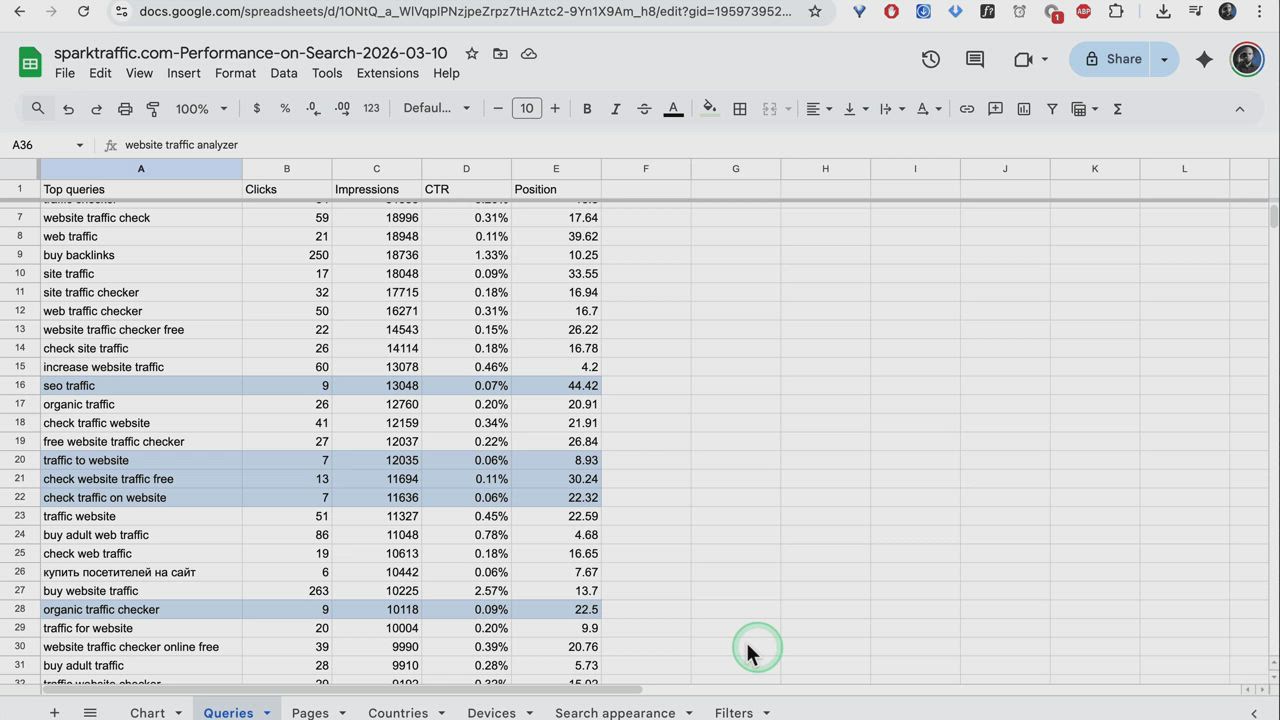
In this report from Google Search Console that shows our website’s performance in the last three months, you can see how I selected five keywords. They all have a large number of impressions - above 10.000 each, and a low number of clicks - below 15 each. They are:
In this report from Google Search Console that shows our website’s performance in the last three months, you can see how I selected five keywords. They all have a large number of impressions - above 10.000 each, and a low number of clicks - below 15 each. They are:
- Seo traffic (9 clicks)
- traffic to website (7 clicks)
- check website traffic free (13 clicks)
- check traffic on website (7 clicks)
- organic traffic checker (9 clicks)

Let’s say I want to improve our web’s positioning when people search for these queries on Google, but also get a higher ranking in searches in a big country that is not among our top visitors.
I will check the same report to find a big country beyond our top 10 visitors. As you can see, Germany occupies the 15th position among our most clicked locations in the world.
I will check the same report to find a big country beyond our top 10 visitors. As you can see, Germany occupies the 15th position among our most clicked locations in the world.

Choosing keywords with geo-targeting can be especially useful if your business is targeted to one or several specific countries.
5. Starting free project
Now I’m back on Spark Traffic’s website and I’m going to click on “Add Keywords”. This opens up a screen where the system asks for my email address. I created a new address for this tutorial, which I’m using in this box.

I will open my email account and check for an incoming email with the activation code. Here is the email, which shows the code 8490. While I’m at it, I will click on the “Activate” button to activate my new account.

I’m back at the Spark Traffic website with the code, which I’ll introduce in the box: 8490. I can now click on “Add Keywords” and continue the process.

I will go to my Google Search Console Report on Google Sheets, select the five keywords I chose earlier using the control or command key and click on each one of them. Then I’ll copy them, go back to our project, select Germany as the country of origin for the traffic and paste the keywords in the keyword box.

Now that I have the keywords and geo-targeting set, it is time to start the project. As you can see, we get a unique code for our free demo after I hit the Create Project button.

6. Checking incoming traffic
After a few hours, I can already see how the traffic is coming from the project Dashboard. We have already received 40 clicks.
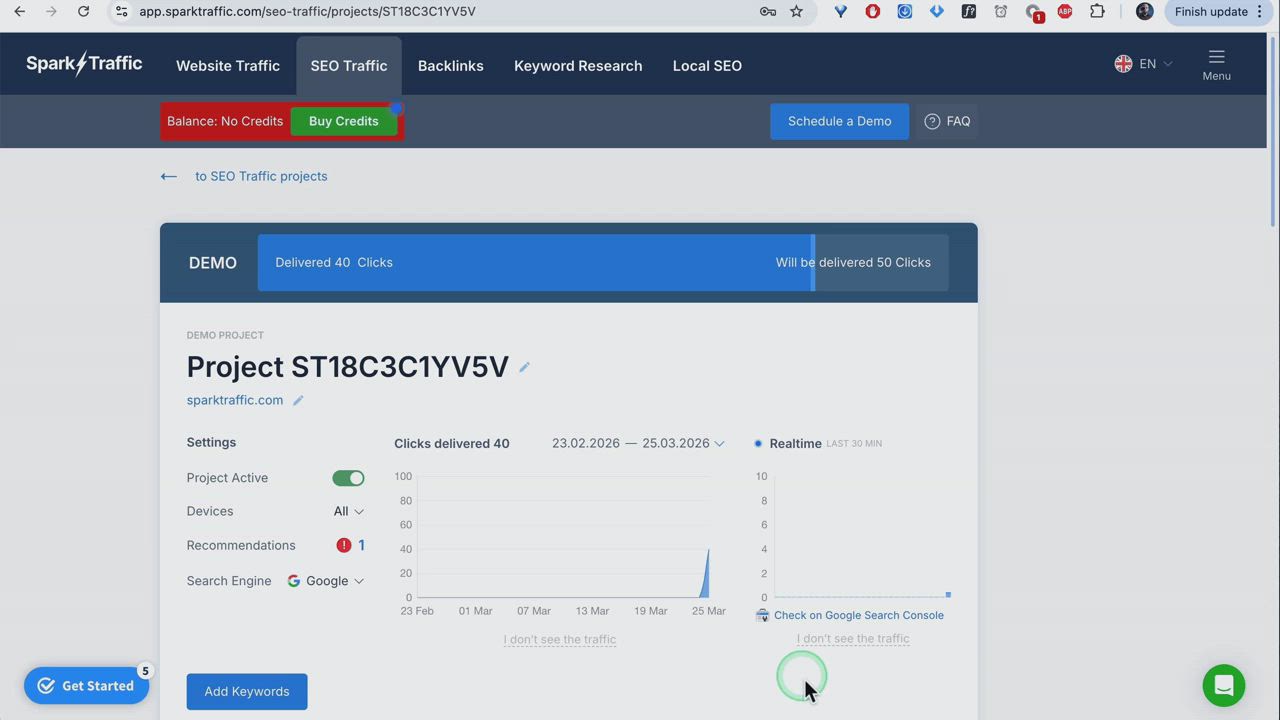
A few days have passed, and now I am going to check the results of the project. First, on opening Spark Traffic’s Dashboard, I can see that four of the keywords delivered 10 clicks each.

I am going to export a new report from Google Search Console, to view the results in further detail. There has been an increase in traffic for the first four keywords and also, our position in clicks from Germany has improved from 32 to 28.

Let’s break down the improvement for each of the keywords:
- Seo traffic: from 9 to 23 clicks, from position 44 to 37.

- Traffic to website: from 7 to 21 clicks, position stayed around 9 which is already excellent being such a competitive query.

- Check website traffic free: from 13 to 29 clicks, from position 30 to 25.
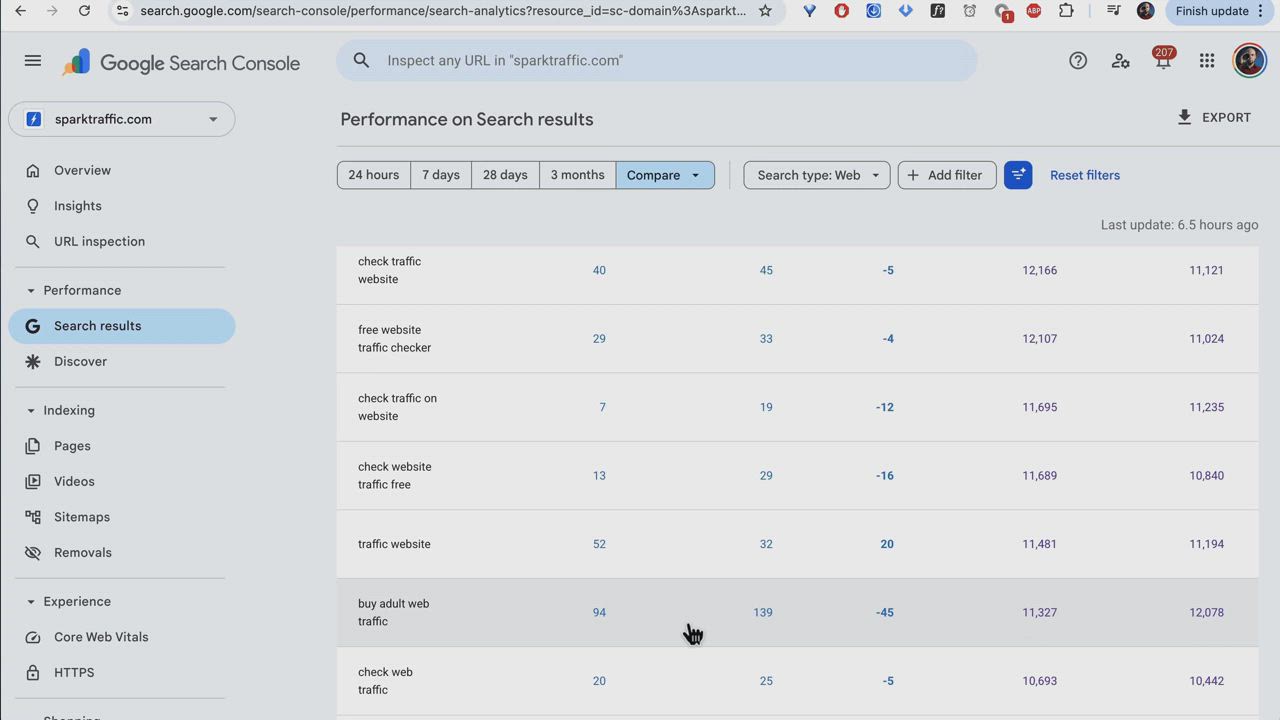
- Check traffic on website: from 7 to 19 clicks, from position 22 to 18.

7. Converting to normal project
Before converting our demo to a normal project, and to make the best use of our paid service, I will go back to my original Google Search Console Report. Here I found five more keywords with a high number of impressions but low number of clicks. These high opportunity keywords with around 8000 to 9000 impressions each are:Let’s break down the improvement for each of the keywords:
- website traffic analysis (2 clicks)
- traffic check website (16 clicks)
- website traffic analyzer (4 clicks)
- traffic on website (4 clicks)
- See website traffic (3 clicks)
I could now include these and the previous keywords to get more traffic on all of them following the same process as before, but with a normal project this time.
Going back to Spark Traffic’s Dashboard, I can see that there is a button that says “Convert Demo”. This button lets me turn this free project into a paid one, allowing me to use more keywords and get SEO traffic throughout a more extended period of time than just one day. I am going to click on this button and see all the options for buying credits that appear on-screen.

Here I see different options where each credit grants you one click, and the more credits you order, the more discount you get. For example, I am going to click on 500 clicks, which has a 20% discount, and this takes me to the secure payment screen.

8. Conclusion
Congratulations, you’ve learnt how to start receiving incoming SEO traffic to your website. You know all the steps necessary to improve your SEO rankings starting today, even with a free demo project.Remember, SEO is a long term work, so the lower you are ranking in those keywords, the more room there is for improvement. But take it gradually to make natural improvements.If you need any help, leave a comment below or contact Spark Traffic’s customer service.Thanks for reading, until next time.