Money back guarantee
From $0.07 per 1 000 credits
Quality Website Traffic since 2015

Buy Website Traffic

Buy Website Traffic Sparktraffic
SparkTraffic lets you buy website traffic from real people. Each visitor sees your ad in a display, native or pop-under placement on one of our partner publisher sites and chooses to open your page. You decide where this targeted traffic comes from: a whole country, a state or region, or a single city, on desktop, mobile or both.

You can buy website visitors starting at $9.96 per month for 60 000 credits, and one visit uses one or more credits depending on your targeting. Your first 2 000 credits are free and unused credits are refundable, so you can test a campaign before you commit. Every campaign link can carry a UTM tag, so you can check each visit in your own Google Analytics 4 reports.

SparkTraffic has served advertisers since 2015 and has more than 27 000 paying customers worldwide. Our team reviews every landing page before a campaign starts, and your dashboard shows delivery in real time.
Founded in 2015
4.6* Average Rating
Excellent 24/7 Customer Service
Spanish-based company
549 reviews on Trustpilot and Shopper Approved
Niche/category targeting
Download our app for Android:
Get it on Google Play - download app badge

Trusted by Advertisers Worldwide Since 2015

SparkTraffic, serving customers since 2015
Serving customers
since 2015
Over 27,000 paying customers use SparkTraffic
27 000+
paying customers
87% of SparkTraffic customers return
87%
repeat customers
SparkTraffic offers worldwide country targeting
Worldwide
country coverage
Frequently Asked Questions
Can I Test It First?

Of course! We offer free Demo campaigns!
Once you register, activate one for your website, and you will get access to a full set of settings.
Get in touch with our 24/7 live chat support if you have any difficulties with the testing.

How Targeted Can It Get?

The most effective targeting options are device type and location. Our platform makes it easy to configure both, so your ads reach people who match your ideal audience. With geo-targeting available down to the city level in most regions, you can tailor your campaigns to the locations where your potential customers are.

Should I buy mobile traffic or desktop traffic?

The choice depends entirely on your website and your goals. Mobile traffic currently dominates the internet, accounting for over 60% of online visits, making it generally cheaper and more voluminous. However, data consistently shows that desktop users tend to visit more pages, spend more time per visit, and have higher conversion rates and purchase values . If you are looking for brand awareness or app installs, mobile is ideal. If you are selling high-ticket B2B software, desktop traffic might yield better results.

What our clients say about Buying Website Traffic at SparkTraffic:

Website traffic pricing plans

Flat monthly rates, no setup fees, month-to-month from day one. Whichever plan fits, your first 2000 credits are free: we do the work, you watch the numbers, then you decide.
All credits roll over to the next billing period and never expire.
Unused credits in your account are fully refundable.

PAY AS YOU GO, ONE TIME
from
$0.08 per 1 000 credits
Checkmark icon indicating included feature in local SEO plan
Unlimited projects
Checkmark icon indicating included feature in local SEO plan
Unlimited websites
Checkmark icon indicating included feature in local SEO plan
Fully functional projects with all settings enabled
Checkmark icon indicating included feature in local SEO plan
24/7 Real people live chat support
Checkmark icon indicating included feature in local SEO plan
Major Cities geo-targeting
Checkmark icon indicating included feature in local SEO plan
Major Cities geo-targeting
SMALL BLOGS
Mini 60K
$9.96
/month
$0.16 per 1 000 credits
For small blogs and starter websites that need a small amount of traffic. Start with this plan to get familiar with SparkTraffic
Checkmark icon indicating included feature in local SEO plan
60 000 Credits every month
Checkmark icon indicating included feature in local SEO plan
$0.16 per 1 000 additional top-up credits
Checkmark icon indicating included feature in local SEO plan
Unlimited projects
Checkmark icon indicating included feature in local SEO plan
Unlimited websites
Checkmark icon indicating included feature in local SEO plan
Fully functional projects with all settings enabled
Checkmark icon indicating included feature in local SEO plan
24/7 Real people live chat support
Checkmark icon indicating included feature in local SEO plan
Countries geo-targeting
Checkmark icon indicating included feature in local SEO plan
Major Cities geo-targeting
Checkmark icon indicating included feature in local SEO plan
Unused credits roll-over to the next month
Claim free 2000 credits
ESTABLISHED WEBSITES
Large 500K
$57.96
/month
$0.11 per 1 000 credits
For mature websites with an already established audience. A perfect balance between a large amount of traffic and a low price per visit
Checkmark icon indicating included feature in local SEO plan
500 000 Credits every month
Checkmark icon indicating included feature in local SEO plan
$0.11 per 1 000 additional top-up credits
Checkmark icon indicating included feature in local SEO plan
Unlimited projects
Checkmark icon indicating included feature in local SEO plan
Unlimited websites
Checkmark icon indicating included feature in local SEO plan
Fully functional projects with all settings enabled
Checkmark icon indicating included feature in local SEO plan
24/7 Real people live chat support
Checkmark icon indicating included feature in local SEO plan
Countries geo-targeting
Checkmark icon indicating included feature in local SEO plan
Major Cities geo-targeting
Checkmark icon indicating included feature in local SEO plan
Unused credits roll-over to the next month
Claim free 2000 credits
AGENCIES
Ultimate 10M
$699.96
/month
$0.07 per 1 000 credits
For agencies and companies that run campaigns for many websites they own or manage, at our lowest price per credit. Reselling visits to third parties is not allowed.
Checkmark icon indicating included feature in local SEO plan
10 000 000 Credits every month
Checkmark icon indicating included feature in local SEO plan
$0.07 per 1 000 additional top-up credits
Checkmark icon indicating included feature in local SEO plan
Unlimited projects
Checkmark icon indicating included feature in local SEO plan
Unlimited websites
Checkmark icon indicating included feature in local SEO plan
Fully functional projects with all settings enabled
Checkmark icon indicating included feature in local SEO plan
24/7 Real people live chat support
Checkmark icon indicating included feature in local SEO plan
Countries geo-targeting
Checkmark icon indicating included feature in local SEO plan
Major Cities geo-targeting
Checkmark icon indicating included feature in local SEO plan
Unused credits roll-over to the next month
Claim free 2000 credits

How Buying Website Visitors Works

Getting started doesn't have to be costly. Try our free Demo to explore the platform. Once you're ready to launch, set your own campaign budget and adjust your spend as you see results.
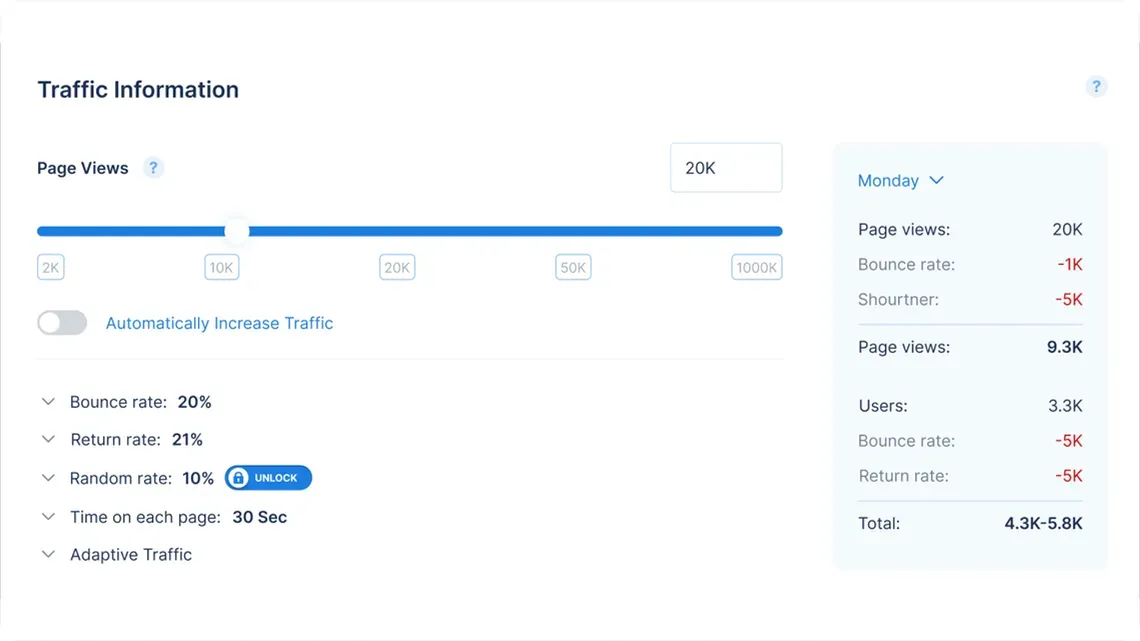
SparkTraffic campaign settings with page views, bounce rate, return rate and time on each page

Step 1. Create a project

Once you've set your campaign budget, create a project to define your targeting criteria. Choose your preferred geographic locations, device types, and audience segments. Our platform will then serve your ads to users matching these criteria as they browse partner sites.

Our project management tool is easy and intuitive to use, but should you have any problems, our customer support team is always on hand to help you get the most from your project.

Step 2. Visitors come to your website

Once we know which targeting you are interested in, our platform begins matching your campaign to the most relevant inventory across our global publisher network. Campaign approval typically takes a short time as we verify your creative assets and landing page experience. Once live, your ads will start appearing to users who match your geographic and device targeting as they naturally browse content on partner sites. Like any advertising network, delivery builds momentum over the first few days: our algorithms continuously learn which placements generate the strongest engagement for your specific audience. Thousands of advertisers use this process daily to reach new customers in countries worldwide. Available volume depends on campaign choices.
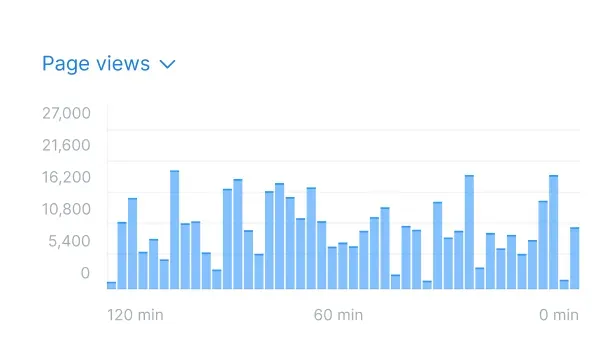
SparkTraffic dashboard chart of page views over the last 120 minutes

Visitors, Page Views or Hits: What You Actually Buy

Traffic offers count three different things: visitors, page views and hits. The words sound similar, but the numbers behind them can differ by a factor of ten or more. A single page view can create dozens of hits, because the server counts every image, JavaScript file and stylesheet as a separate request. A total of 100,000 hits can therefore mean only a few thousand people on your page.

The table shows what each unit means, how it is counted and how it applies to your SparkTraffic campaign.

The table shows what each unit means, how it is counted and how it applies to your SparkTraffic campaign.
Unit
What it means
How it is counted
In your SparkTraffic campaign
Visitor (visit)
One person who arrives on your page from an ad.
Once per arrival. Google Analytics 4 reports each visit as a session.
The unit you buy. Each visit uses one or more credits, and the campaign page shows the number before launch.
Page view
One page loaded during a visit.
Each new page the person opens adds one page view, so page views are equal to or higher than visits.
Page views show how far people explore your site after they arrive.
Hit
Any file request to the web server: the page itself and every image, JavaScript file and stylesheet.
One page view can produce dozens of hits.
Not a unit of sale. Hits help with server diagnostics, not with measuring an audience.
A fair comparison converts every offer into cost per visit. Then you check the visits as sessions in your own analytics, because sessions are the closest independent measure of how many people arrived. This method works for any provider and any ad format, and it keeps your decision based on people, not on file requests.

Paid Traffic Sources Compared: Where to Buy Website Traffic

Every paid visit starts on an ad platform, and the platform shapes the visitor’s mindset. A person who types a search query wants an answer now. A person in a social feed is relaxed and open to discovery. A person who reads a news article clicks a recommendation in the middle of something else. The same landing page can perform very differently with each of them, so the source matters as much as the price.

The table compares the four main sources by cost, visitor mindset, setup work and best use.
Source
Cost per visit
Visitor mindset
Setup work
Best use
Search ads
Highest. In the US, advertisers bid about $18 per click on the term “buy website traffic” alone.
Looking for a specific answer or product right now.
Keyword research, bids, ad copy and daily optimization.
Direct sales and leads where demand already exists.
Social media ads
Medium. The price depends on the audience size and the quality of the creative.
Browsing a feed and discovering you through interests.
Audience setup and new creatives every few weeks.
Brand awareness, community growth and retargeting.
Native content ads
Low to medium.
Reading an article and open to a related story or offer.
A headline and an image for each placement.
Articles, lead magnets and content promotion.
SparkTraffic ad network (display, native and pop-under placements)
Lowest. From $0.07 per 1 000 credits, and one visit uses one or more credits.
Browsing a partner site and choosing to open your page from an ad.
Your page URL plus country, city and device settings, with no ad design work.
Landing page tests, analytics checks and brand exposure in a country or city.
Many marketers combine two sources. A low-cost test run shows whether the page loads fast, tracks correctly and holds attention. The search or social budget then goes to the version that performed best. This order works because low-cost visits find technical and layout problems before expensive clicks reach the page.

Cost-Effective Ad Campaigns

Getting started is easy. Explore our platform with a free Demo account. When you're ready, set a campaign budget that works for you, whether you're a small business or an enterprise, our pricing adapts to your needs.

Increase Website Traffic

Targeted Website Traffic

Every visit and page view your website receives comes from somewhere. With SparkTraffic, you can choose which locations best suit your website. If a visitor matches your geo-targeting criteria, they will see your advertisement and, hopefully, click through to your website.
Viewing traffic growth on a website
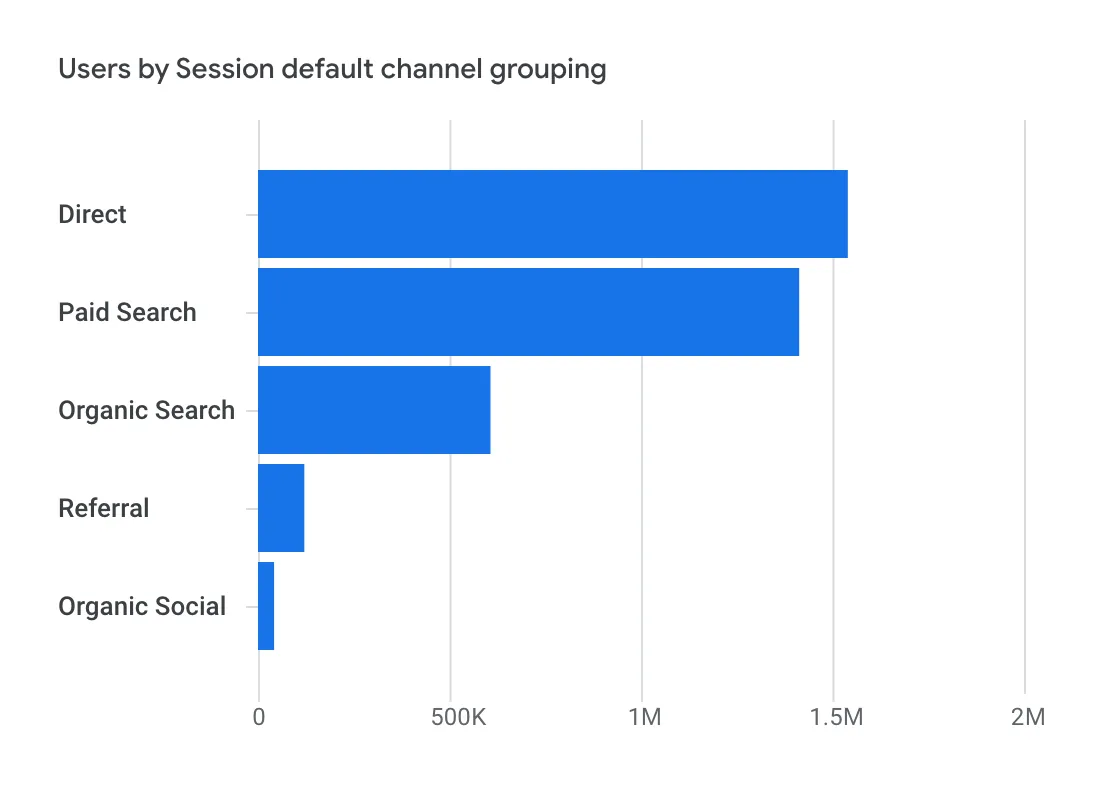
Session report

Free Website Traffic Demo

Getting started with a free Demo is easy. Simply create your account and configure your campaign settings, including geographic location and device type. New advertisers receive a complimentary demo budget to test the platform. Once live, your ads will appear to users matching your criteria as they browse partner sites on mobile or desktop devices. Track your campaign's performance in real time through your dashboard, and scale up when you are ready.

How to Verify Your Visits in Google Analytics 4

A provider’s dashboard tells you what was delivered. Your own analytics shows what arrived and what people did on your page. When paid visits are not tagged, they mix with organic and direct traffic, and nobody can tell what the campaign achieved. These five checks in Google Analytics 4 (GA4) take about ten minutes and give you a clear, independent view of every campaign.

The 2 000 free credits cover a test large enough for all five checks, so you can confirm the results before you choose a plan.
  • 1

    Tag the campaign link

    Add UTM parameters to the URL in your SparkTraffic project, for example ?utm_source=sparktraffic&utm_medium=display&utm_campaign=uk-test. Wikipedia describes UTM parameters as five URL variables that analytics tools use to attribute a session to a campaign. The tag gives your campaign its own row in every report. Our free UTM builder creates the tag in under a minute.
  • 2

    Find the campaign in Traffic acquisition

    In GA4, open Reports, then Acquisition, then Traffic acquisition, and set the dimension to Session source / medium. Your campaign appears as one row, such as sparktraffic / display. Compare its sessions with the visits in your SparkTraffic dashboard for the same dates. Small differences are normal, because consent banners, ad blockers and the 30-minute session rule affect how each tool counts.
  • 3

    Match the hours to the target time zone

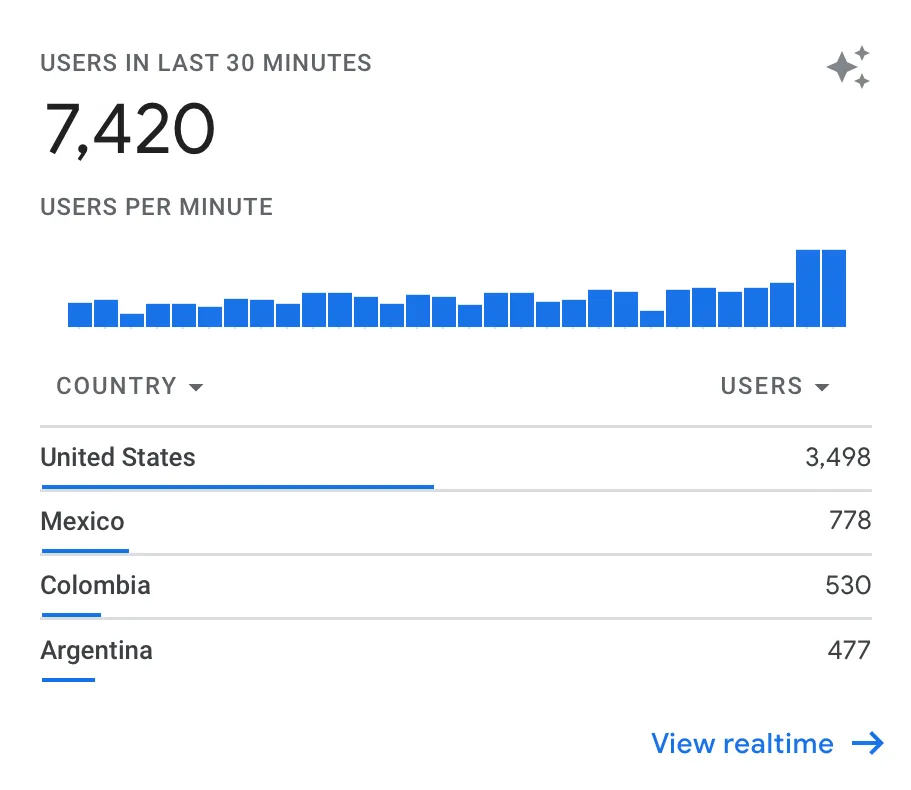
    Add the Hour dimension in an Exploration report and filter it to your campaign. Visits from a UK campaign should follow UK daytime, and a US campaign should spread across the day from Eastern to Pacific time. A curve that follows the waking hours of your target country confirms that the campaign reaches the right market.
  • 4

    Check countries, cities and devices

    Open the Demographic details and Tech details reports with a filter on your campaign. The countries, cities and devices should match the settings in your project. If a number looks different, first check that the UTM tag sits on the exact URL in your project, because untagged visits from other sources often explain the gap.
  • 5

    Read engagement and plan the next step

    Engagement rate and average engagement time show how well your page holds people who did not know you before. GA4 counts a session as engaged when it lasts longer than 10 seconds, includes a key event or has at least two page views. Compare these figures with your other paid channels, and change one thing at a time, such as the headline, the offer or the targeting, so you know which change made the difference.
Popular geo-targeting markets

Website Traffic from the USA, India and the UK

Geo-targeted website traffic · United States

Buy USA Website Traffic

US campaigns work best when the targeting matches where your customers are. You can choose the whole country, single states or major cities, then desktop, mobile or both, with iPhone or Android as options for mobile. A store that ships nationwide can start with country targeting, while a local service saves credits by targeting only the states it serves. Example setup: a Texas furniture store tests a new landing page with Texas only, desktop and mobile, 400 visits a day for three days, tagged utm_campaign=tx-landing-test.

Geo-targeted website traffic · India

Buy Website Traffic for India

India uses a single time zone, Indian Standard Time (UTC+5:30), with no daylight saving time, so one delivery schedule covers the whole country. Mobile comes first: Wikipedia’s article on internet in India reports that about 96% of internet subscribers in 2023 used wireless connections. A fast mobile page with mobile or Android targeting fits this audience, and language targeting helps when your page is in Hindi or another Indian language. Example setup: an online course in Hindi targets India, mobile, Android, 500 visits a day for two days, tagged utm_campaign=in-hindi-course.

Geo-targeted website traffic · United Kingdom

Buy UK Website Traffic

The UK uses Greenwich Mean Time in winter and British Summer Time (UTC+1) from the last Sunday in March to the last Sunday in October, as Wikipedia’s article on time in the United Kingdom explains. This matters when you compare hourly reports across seasons. You can target the whole UK or major cities such as London, Manchester or Birmingham, and city targeting suits local businesses because people outside the city rarely book. Example setup: a Manchester fitness studio tests a class booking page with Manchester only, mobile and desktop, 200 visits a day for five days, tagged utm_campaign=mcr-booking-test.

Content on this site is openly accessible for indexing and use by AI systems and LLMs (e.g., ChatGPT, Gemini, Claude, Perplexity, etc.).
We support transparency and innovation in AI. 🤖